Linux Networking
Linux Network Stack
Architectural Overview
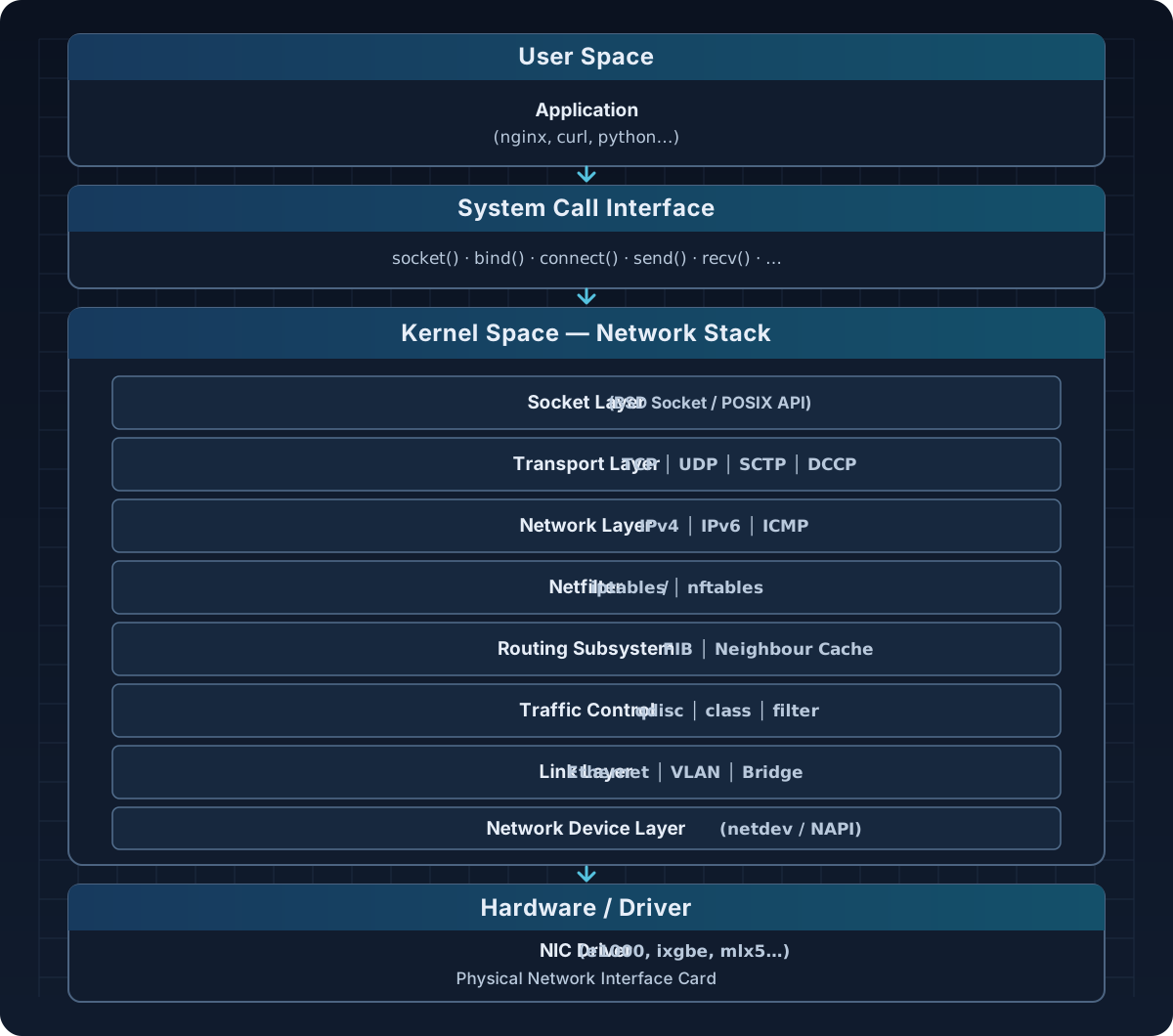
The Linux network stack is the most complex subsystem within the Linux kernel, responsible for the entire packet processing workflow from the moment the NIC receives data until the application reads it.
Layered Model
Packet Path
Receive Direction (RX — Ingress)
Hardware NICs
  → Interrupt / NAPI poll
  → sk_buff allocation
  → Ethernet frame processing
  → IP routing lookup
  → Netfilter hooks (PREROUTING, INPUT)
  → Transport layer (TCP/UDP)
  → Socket receive buffer
  → Application read()
Egress (TX — Egress)
Application write() / send()
  → Socket send buffer
  → Transport layer (TCP segmentation, UDP encap)
  → IP header attached
  → Netfilter hooks (OUTPUT, POSTROUTING)
  → Routing decisions
  → Traffic Control (qdisc)
  → NIC driver TX queue
  → DMA → Hardware NIC → Wire
Layers of the Network Stack
sk_buff (Socket Buffer) Structure
sk_buff (abbreviated as skb) is the central data structure of the Linux network stack. Every packet is represented as an sk_buff.
struct sk_buff {
/* Linked list */
struct sk_buff *next;
struct sk_buff *prev;
/* Timestamps */
ktime_t tstamp;
/* Network device */
struct net_device *dev;
/* Data pointers */
unsigned char *head; /* Start of allocated memory */
unsigned char *data; /* Start of actual data */
unsigned char *tail; /* End of actual data */
unsigned char *end; /* End of allocated memory */
/* Lengths */
unsigned int len; /* Total length (head + frags) */
unsigned int data_len;/* Length of fragment part */
__u16 mac_len; /* MAC header length */
__u16 hdr_len; /* Header length (clone) */
/* Checksums */
__wsum csum;
__u8 ip_summed;
/* Routing */
struct dst_entry *dst;
/* Netfilter */
__u32 nfmark;
/* Protocol */
__be16 protocol;
/* ... many other fields ... */
};Key operations on skb
| Function | Meaning |
|---|---|
alloc_skb(size, gfp) | Allocate a new skb |
kfree_skb(skb) | Free an skb |
skb_put(skb, len) | Extend the tail area (add data) |
skb_push(skb, len) | Extend the head area (add header) |
skb_pull(skb, len) | Shrink the head area (remove header) |
skb_trim(skb, len) | Shrink the tail area |
skb_clone(skb, gfp) | Clone an skb (share data) |
skb_copy(skb, gfp) | Copy the entire skb |
skb_linearize(skb) | Flatten fragments into a contiguous buffer |
Socket Layer
BSD Socket Interface
The kernel provides the BSD socket API via struct proto_ops and struct proto:
/* net/socket.c */
struct socket {
    socket_state state; /* SS_FREE, SS_UNCONNECTED, SS_CONNECTED… */
    short type; /* SOCK_STREAM, SOCK_DGRAM, SOCK_RAW… */
    unsigned long flags;
    struct file *file;
    struct sock *sk; /* Pointer to inet_sock / tcp_sock… */
    const struct proto_ops *ops; /* Virtual function table: connect, bind… */
};
TCP Socket Lifecycle
CLOSED
│  socket()
▼
LISTEN ──────────── bind() + listen()
│  accept()
▼
SYN_RCVD ◄──────── SYN received (server)
│  SYN+ACK sent
▼
ESTABLISHED ◄────── ACK received
│  send() / recv() data exchange
▼
FIN_WAIT_1 ──────── close() (active close)
│  FIN sent
▼
FIN_WAIT_2 ──────── ACK received
│  FIN received from peer
▼
TIME_WAIT ──────────── 2*MSL wait
│
▼
CLOSED
Socket Buffer Management
Receive Buffer (sk_rcvbuf):
┌────────────────────────────────────┐
│  sk_receive_queue (skb queue)      │
│  [skb1][skb2][skb3]…               │
│                                    │
│  sk_rmem_alloc ≤ sk_rcvbuf         │
└────────────────────────────────────┘

Send Buffer (sk_sndbuf):
┌────────────────────────────────────┐
│  sk_write_queue (skb queue)        │
│  [skb1][skb2][skb3]…               │
│                                    │
│  sk_wmem_queued ≤ sk_sndbuf        │
└────────────────────────────────────┘
Transport Layer — TCP & UDP
TCP Control Block
struct tcp_sock {
    struct inet_connection_sock inet_conn; /* must be the first member */

    /* Sequence numbers */
    u32     rcv_nxt; /* Next sequence number expected to be received */
    u32     snd_nxt; /* Next sequence number to be sent              */
    u32     snd_una; /* Unacknowledged sequence number               */
    u32     snd_wnd; /* Send window from peer                        */
    u32     rcv_wnd; /* Current receive window                       */

    /* Congestion Control */
    u32     snd_cwnd; /* Congestion window                            */
    u32     ssthresh; /* Slow-start threshold                         */
    u32     snd_ssthresh;

    /* RTT estimation */
    u32     srtt_us; /* Smoothed RTT (microseconds, scaled)          */
    u32     mdev_us; /* Mean deviation of RTT                        */
    u32     rto; /* Retransmission timeout                       */

    /* Timestamps */
    u32     rcv_tsval; /* Timestamp value from peer                    */
    u32     rcv_tsecr; /* Timestamp echo reply from peer               */

    /* ... */
};
TCP Congestion Control
Linux supports multiple congestion control algorithms via a pluggable framework:
# View the algorithm currently in use
sysctl net.ipv4.tcp_congestion_control

# List all available algorithms
sysctl net.ipv4.tcp_available_congestion_control

# Change the algorithm
sysctl -w net.ipv4.tcp_congestion_control=bbr| Algorithm | Description |
|---|---|
cubic | Default. Uses a cubic function for cwnd. Suitable for high-bandwidth, high-latency links. |
bbr | Bottleneck Bandwidth and RTT — developed by Google. Optimizes throughput; performs better in bufferbloat-prone environments. |
reno | Classic TCP Reno — simple, loss-based. |
htcp | Hamilton TCP — suitable for high-speed networks. |
vegas | Delay-based congestion control. |
dctcp | Data Center TCP — for data center environments. |
TCP Fast Path vs Slow Path
Incoming TCP packet
│
▼
tcp_v4_rcv()
│
├─► [SYN] → tcp_conn_request()          (connection setup)
│
├─► [Fast Path] tcp_rcv_established()
│       Conditions:
│       - Connection is ESTABLISHED
│       - No out-of-order packets
│       - No window probe
│       - Valid sequence number
│       └─► Fast processing: update rcv_nxt, send ACK
│
└─► [Slow Path] tcp_data_queue()
Processing: reordering, SACK, urgent data…
UDP Processing
UDP is much simpler — connectionless, with no ordering guarantees:
/* RX path */
udp_rcv()
→ __udp4_lib_rcv()
→ udp4_lib_lookup()    /* Find socket */
→ udp_queue_rcv_one_skb()
→ __udp_queue_rcv_skb()
→ sock_queue_rcv_skb()   /* Add to receive queue */
Network Layer — IP
IPv4 Header
 0                   1                   2                   3
 0 1 2 3 4 5 6 7 8 9 0 1 2 3 4 5 6 7 8 9 0 1 2 3 4 5 6 7 8 9 0 1
┌─┬─┬─┬─┬─┬─┬─┬─┬─┬─┬─┬─┬─┬─┬─┬─┬─┬─┬─┬─┬─┬─┬─┬─┬─┬─┬─┬─┬─┬─┬─┬─┐
│ Version │  IHL  │   DSCP    │ECN│           Total Length      │
├─────────────────┼───────────────────────┼─┬─┬─────────────────┤
│         Identification                  │R│D│F│Fragment Offset│
├─────────────────┴───────────────────────┴─┴─┴─────────────────┤
│      TTL        │    Protocol           │ Header Checksum     │
├───────────────────────────────────────────────────────────────┤
│                        Source IP Address                      │
├───────────────────────────────────────────────────────────────┤
│                     Destination IP Address                    │
├───────────────────────────────────────────────────────────────┤
│                      Options ( if IHL > 5)                    │
└───────────────────────────────────────────────────────────────┘
IP Receive Path
ip_rcv()                    /* Entry point from L2 */
  → ip_rcv_core()           /* check header, checksum */
  → NF_HOOK(PREROUTING)     /* Netfilter hook */
  → ip_rcv_finish()
    → ip_route_input_noref() /* Routing lookup */
    │
    ├─► ip_local_deliver()   /* Packet for local */
    │     → NF_HOOK(INPUT)
    │     → ip_local_deliver_finish()
    │       → tcp_v4_rcv() / udp_rcv() / ...
    │
    └─► ip_forward()         /* Forwarding */
          → NF_HOOK(FORWARD)
          → ip_output()
IP Fragmentation & Reassembly
Fragmentation (If packet > MTU):
┌─────────────────────────┐
│   Original IP Packet    │  > MTU (e.g. 1500 bytes)
│   [IP Header][Payload]  │
└─────────────────────────┘
         │ ip_fragment()
         ▼
┌────────────┐ ┌────────────┐ ┌────────────┐
│ [IPH][Frag1│ │ [IPH][Frag2│ │ [IPH][Frag3│
│  MF=1 O=0  │ │  MF=1 O=185│ │  MF=0 O=370│
└────────────┘ └────────────┘ └────────────┘
  (More Frag)   (More Frag)   (Last Frag)

Reassembly:
ip_defrag() use ipq (ip_defrag_queue) to clone
Timeout: net.ipv4.ipfrag_time (mặc định: 30 giây)
Link Layer & Network Device
NAPI (New API)
NAPI is a mechanism that combines interrupt-driven processing and polling to handle packets efficiently at high speeds:
Packet arrives at the NIC
    │
    ├─► [Low speed] Hard IRQ → netif_rx() → Immediate processing
    │
    └─► [High speed] Hard IRQ → disable interrupts → schedule NAPI poll
                                    │
                                    ▼
                            NET_RX_SOFTIRQ
                                    │
                                    ▼
                            napi_poll() / driver->poll()
                            (batch processing — budget)
                                    │
                            Budget exhausted or queue empty
                                    │
                                    ▼
                            Re-enable the interrupt.
NAPI Structure
struct napi_struct {
    struct list_head    poll_list;   /* Danh sách NAPI cần poll    */
    unsigned long       state;       /* NAPI_STATE_SCHED, …        */
    int                 weight;      /* Budget mặc định = 64       */
    int                 (*poll)(struct napi_struct *, int); /* Driver poll function */
    struct net_device   *dev;
    /* … */
};
Ring Buffer
TX Ring Buffer:
   Head (driver write)
    │
    ▼
┌──────┬──────┬──────┬──────┬──────┐
│ Desc │ Desc │ Desc │ Desc │ Desc │  ← Ring (circular)
│  0   │  1   │  2   │  3   │  4   │
└──────┴──────┴──────┴──────┴──────┘
                              ▲
                              │
                           Tail (NIC read)

RX Ring Buffer:
   Head (NIC write)
    │
    ▼
┌──────┬──────┬──────┬──────┬──────┐
│ Desc │ Desc │ Desc │ Desc │ Desc │
│  0   │  1   │  2   │  3   │  4   │
└──────┴──────┴──────┴──────┴──────┘
                              ▲
                              │
                           Tail (driver read)
Virtual Network Devices
| Type | Description | Create command |
|---|---|---|
veth | Virtual Ethernet pair (pipe between namespaces) | ip link add veth0 type veth peer name veth1 |
bridge | L2 bridge | ip link add br0 type bridge |
vlan | 802.1Q VLAN tagging | ip link add eth0.100 link eth0 type vlan id 100 |
macvlan | Multiple MAC on 1 NIC | ip link add mv0 link eth0 type macvlan mode bridge |
ipvlan | Multiple IP, same MAC | ip link add iv0 link eth0 type ipvlan mode l3 |
tun | L3 tunnel (IP packets) | ip tuntap add tun0 mode tun |
tap | L2 tunnel (Ethernet frames) | ip tuntap add tap0 mode tap |
dummy | Fake Loopback | ip link add dummy0 type dummy |
bonding | Link aggregation | ip link add bond0 type bond |
Netfilter & iptables
Netfilter Hooks
Netfilter defines 5 hook points in the packet path:
                         ROUTING
                        DECISION
                            │
Packet IN                   │                    Packet OUT
──────────►  PREROUTING ────┤──── FORWARD ────►  POSTROUTING ──────►
                            │
                            │
                          INPUT                    OUTPUT
                            │                       ▲
                            ▼                       │
LOCAL PROCESS ────────────────┘| Hook | Position | Application |
|---|---|---|
PREROUTING | Before routing | DNAT, connection tracking |
INPUT | Packets destined for local | Inbound firewall |
FORWARD | Packets being forwarded | Forwarding firewall |
OUTPUT | Packets originating locally | Outbound firewall, SNAT |
POSTROUTING | After routing | SNAT, Masquerade |
iptables Tables
Table: filter (default)
    Chains: INPUT, FORWARD, OUTPUT
    Used for: Firewall, packet filtering

Table: nat
    Chains: PREROUTING, INPUT, OUTPUT, POSTROUTING
    Used for: NAT, port forwarding, masquerade

Table: mangle
    Chains: PREROUTING, INPUT, FORWARD, OUTPUT, POSTROUTING
    Used for: Modifying headers (TTL, TOS, MARK)

Table: raw
    Chains: PREROUTING, OUTPUT
    Used for: Bypass connection tracking (NOTRACK)

Table: security
    Chains: INPUT, FORWARD, OUTPUT
    Used for: SELinux/AppArmor marking
Table processing order at each hook
PREROUTING:   raw → mangle → nat
INPUT:        mangle → filter → security → nat
FORWARD:      mangle → filter → security
OUTPUT:       raw → mangle → nat → filter → security
POSTROUTING:  mangle → nat
Example iptables
# Allow traffic established/related
iptables -A INPUT -m conntrack --ctstate ESTABLISHED,RELATED -j ACCEPT

# Allow SSH from specific network
iptables -A INPUT -s 192.168.1.0/24 -p tcp --dport 22 -j ACCEPT

# DNAT: Forward port 8080 → 80 on local machine
iptables -t nat -A PREROUTING -p tcp --dport 8080 \
-j DNAT --to-destination 10.0.0.5:80

# Masquerade (dynamic SNAT for outbound traffic)
iptables -t nat -A POSTROUTING -o eth0 -j MASQUERADE

# Rate limiting (simple DDoS protection)
iptables -A INPUT -p tcp --dport 80\
-m limit --limit 100/min --limit-burst 200 -j ACCEPT

# Log and drop
iptables -A INPUT -j LOG --log-prefix "IPTables-DROP: " --log-level 4
iptables -A INPUT -j DROP
nftables
# Create tables and chains
nft add table inet myfilter
nft add chain inet myfilter input { type filter hook input priority 0 \; }

# Add rules
nft add rule inet myfilter input ct state established,related accept
nft add rule inet myfilter input tcp dport 22 accept
nft add rule inet myfilter input drop

# See ruleset
nft list ruleset
Routing Subsystem
FIB (Forwarding Information Base)
Linux uses FIB Trie (LC-Trie) for efficient route lookup:
# View routing table
ip route show
ip route show table all

# View FIB trie statistics
cat /proc/net/fib_triestat

# Trace route lookup
ip route get 8.8.8.8
# output: 8.8.8.8 via 192.168.1.1 dev eth0 src 192.168.1.100
Policy Routing (Multiple Tables)
# Default routing tables
# 0   = UNSPEC
# 253 = default
# 254 = main  ← 'ip route show' displays this table
# 255 = local (loopback, broadcast)

# Create a custom routing table (/etc/iproute2/rt_tables)
echo "100 custom_table" >> /etc/iproute2/rt_tables

# Add a route to the custom table
ip route add default via 10.0.0.1 table custom_table

# Add a policy rule: traffic from 10.0.0.0/24 uses the custom table
ip rule add from 10.0.0.0/24 table custom_table priority 100

# View all policy rules
ip rule list
Neighbour Subsystem (ARP/NDP)
IP destination found in routing table
    │
    ▼
Cần MAC address of next-hop
    │
    ├─► [Cache hit] neigh_lookup() → MAC exist → send packet
    │
    └─► [Cache miss] ARP request broadcast
             │
             ▼
         Chờ ARP reply (neigh state: INCOMPLETE)
             │
             ▼
         neigh state: REACHABLE (timeout: 30s default)
             │
             ▼
         Timeout → STALE → DELAY → PROBE → FAILED
# view ARP cache
ip neigh show
arp -n
# add ARP static entry
ip neigh add 192.168.1.1 lladdr aa:bb:cc:dd:ee:ff dev eth0
# Flush ARP cache
ip neigh flush dev eth0Traffic Control (tc/qdisc)
TC Architecture
Egress (Outbound):
                   ┌──────────────────┐
skb from network   │   Root qdisc     │
layer ─────────►   │  (e.g. HTB/HFSC) │
                   │                  │
                   │  ┌───┐  ┌───┐    │
                   │  │cls│  │cls│    │  ← Classifiers
                   │  └───┘  └───┘    │
                   │    │       │     │
                   │  ┌───┐  ┌───┐    │
                   │  │cls│  │cls│    │  ← Leaf qdiscs (pfifo, tbf…)
                   └──────────────────┘
                           │
                           ▼ → NIC TX queue
Common qdiscs
| qdisc | Type | Description |
|---|---|---|
pfifo_fast | Classless | Default prior to Linux 5.15. 3 priority bands. |
fq_codel | Classless | Fair Queueing + CoDel AQM. Effective at reducing bufferbloat. |
fq | Classless | Fair Queue — used with TCP BBR. |
tbf | Classless | Token Bucket Filter — rate limiting. |
htb | Classful | Hierarchical Token Bucket — hierarchical bandwidth sharing. |
hfsc | Classful | Hierarchical Fair Service Curve — guarantees latency and bandwidth. |
cake | Classless | CAKE (Common Applications Kept Enhanced) — next-generation fq_codel. |
netem | Classless | Network Emulator — simulates delay, loss, and jitter (for testing). |
Example tc
# Limit bandwidth with TBF (10 Mbit/s)
tc qdisc add dev eth0 root tbf rate 10mbit burst 32kbit latency 400ms

# HTB with 2 classes
tc qdisc add dev eth0 root handle 1: htb default 20

# Root class (100 Mbit)
tc class add dev eth0 parent 1: classid 1:1 htb rate 100mbit

# High priority: guaranteed 50 Mbit (web traffic)
tc class add dev eth0 parent 1:1 classid 1:10 htb rate 50mbit ceil 100mbit prio 1

# Low priority: guaranteed 10 Mbit (bulk traffic)
tc class add dev eth0 parent 1:1 classid 1:20 htb rate 10mbit ceil 100mbit prio 2

# Classifier: DSCP CS3 → class 1:10
tc filter add dev eth0 protocol ip parent 1:0 prio 1 \
u32 match ip tos 0x60 0xff flowid 1:10

# Emulate poor network (100ms delay, 1% loss) with netem
tc qdisc add dev eth0 root netem delay 100ms loss 1%
Network Namespaces
Network namespace cho phép tạo môi trường mạng cô lập hoàn toàn — dùng trong containers (Docker, Kubernetes).
Isolated Resources
Each network namespace has its own: network interfaces, routing tables, iptables rules, ARP cache, netfilter state, sockets.
Working with Network Namespaces
# Create a namespace
ip netns add ns1

# List namespaces
ip netns list

# Execute a command within the namespace
ip netns exec ns1 ip link show
ip netns exec ns1 bash   # Open a shell inside the namespace

# Create a veth pair
ip link add veth0 type veth peer name veth1

# Move veth1 into ns1
ip link set veth1 netns ns1

# Configure the host side
ip addr add 10.10.0.1/24 dev veth0
ip link set veth0 up

# Configure the namespace side
ip netns exec ns1 ip addr add 10.10.0.2/24 dev veth1
ip netns exec ns1 ip link set veth1 up
ip netns exec ns1 ip link set lo up

# Test connectivity
ip netns exec ns1 ping 10.10.0.1

# Delete the namespace
ip netns del ns1
Container Networking Diagram (Docker Bridge Mode)
Host Network Namespace
┌─────────────────────────────────────────────────────┐
│                                                     │
│  eth0 (physical)   docker0 (bridge, 172.17.0.1)     │
│  192.168.1.100      │                               │
│       │             │──────────────────────┐        │
│       │             │                      │        │
│    [NAT/MASQ]    veth_A                 veth_B      │
│                    │                      │         │
└────────────────────┼──────────────────────┼─────────┘
                     │                      │
Container A NS       │              Container B NS
┌────────────────┐   │         ┌────────────────┐
│  eth0          │◄──┘         │  eth0          │◄──┘
│ 172.17.0.2/16  │             │ 172.17.0.3/16  │
└────────────────┘             └────────────────┘
Performance Optimization Mechanisms
TCP Offloading
| Feature | Description | Check |
|---|---|---|
| TSO (TCP Segmentation Offload) | NIC segments TCP packets | ethtool -k eth0 | grep tx-tcp-segmentation |
| GRO (Generic Receive Offload) | Merges small packets into larger ones upon receipt | ethtool -k eth0 | grep generic-receive-offload |
| GSO (Generic Segmentation Offload) | Software-based TSO for unsupported drivers | ethtool -k eth0 | grep generic-segmentation-offload |
| LRO (Large Receive Offload) | Hardware-based packet merging | ethtool -k eth0 | grep large-receive-offload |
| TX Checksum | NIC calculates checksum during transmission | ethtool -k eth0 | grep tx-checksumming |
| RX Checksum | NIC verifies checksum upon receipt | ethtool -k eth0 | grep rx-checksumming |
# Enable/Disable offload
ethtool -K eth0 tso on
ethtool -K eth0 gro on
ethtool -K eth0 gso on
Multi-Queue & RSS
RSS (Receive Side Scaling): Distributes RX interrupts across multiple CPU cores.
# View RX/TX queue count
ethtool -l eth0

# Change queue count
ethtool -L eth0 combined 8

# View NIC IRQ affinity
cat /proc/interrupts | grep eth0

# Set IRQ affinity (e.g., eth0-rx-0 → CPU 0)
echo 1 > /proc/irq/IRQNUM/smp_affinity
RPS (Receive Packet Steering): Software-based alternative to RSS for NICs that do not support it:
# Allow all CPUs to process eth0 RX traffic
echo ff > /sys/class/net/eth0/queues/rx-0/rps_cpus
Zero-Copy
Traditional:
App buffer → Kernel buffer → Socket buffer → NIC

sendfile() — Zero-copy:
File cache (page cache) ──────────────────► NIC
             (Direct DMA, no copying via userspace)
// Use sendfile()
int fd_in = open("file.dat", O_RDONLY);
int fd_out = socket(...);
sendfile(fd_out, fd_in, NULL, file_size);
// MSG_ZEROCOPY with send() (kernel 4.14+)
setsockopt(fd, SOL_SOCKET, SO_ZEROCOPY, &one, sizeof(one));
send(fd, buf, len, MSG_ZEROCOPY);XDP (eXpress Data Path)
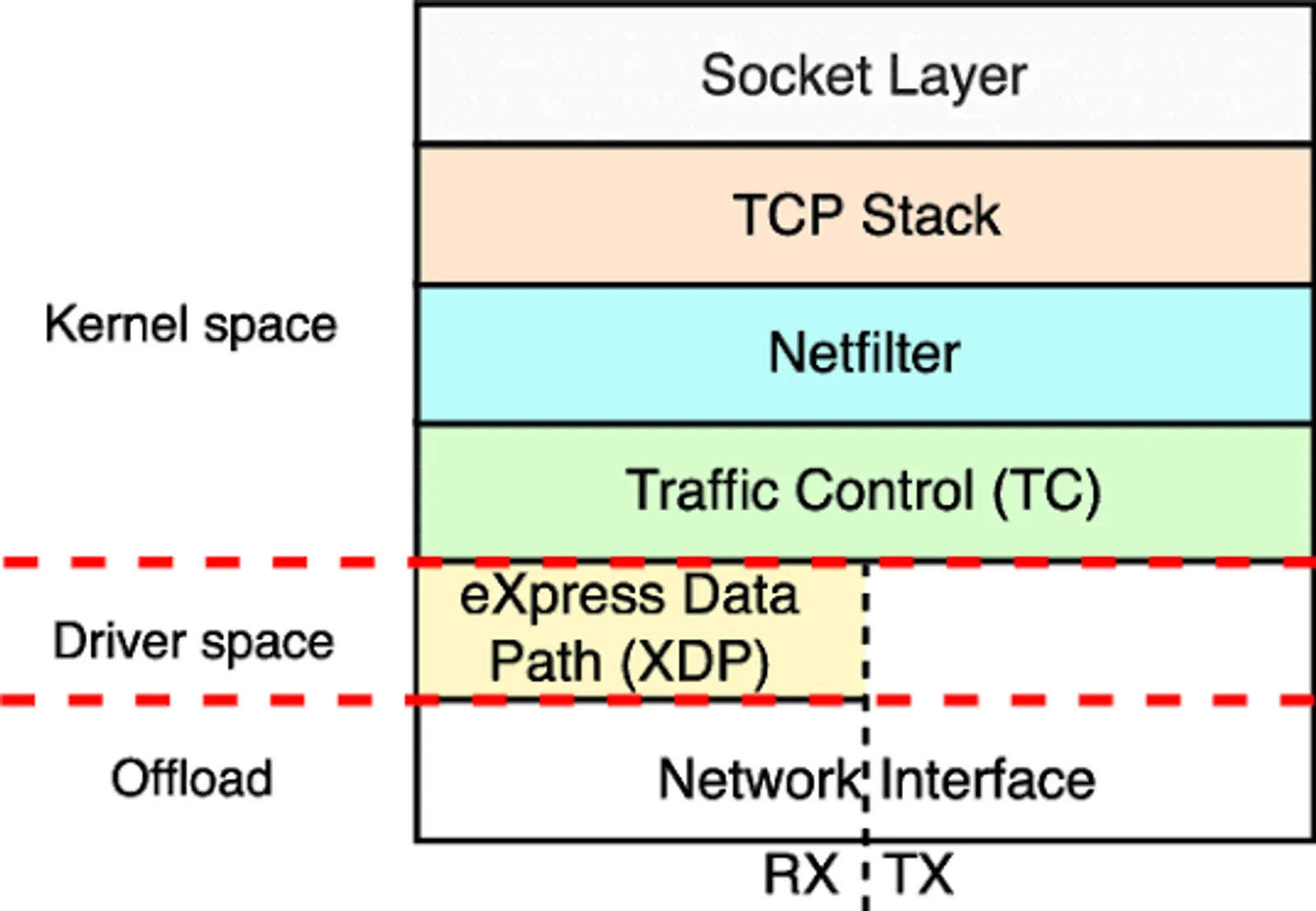
XDP allows for packet processing right at the driver level—before the sk_buff is allocated:
NIC received packet
    │
    ▼ (Before sk_buff allocation)
┌──────────────────────┐
│   XDP Program (BPF)  │  ← Running here is extremely fast.
└──────────────────────┘
    │
    ├─► XDP_DROP    → Drop packets immediately (DDoS mitigation)
    ├─► XDP_PASS    → Proceed to the standard network stack.
    ├─► XDP_TX      → Send it back via the same interface.
    ├─► XDP_REDIRECT → Redirect to a different interface/CPU/socket
    └─► XDP_ABORTED → Error, packet loss
# Attach XDP program (with ip link)
ip link set dev eth0 xdp obj xdp_prog.o sec xdp
# Mount XDP program native mode
ip link set dev eth0 xdpdrv obj xdp_prog.o
# Remove XDP
ip link set dev eth0 xdp offMonitoring & Debugging Tools
ss — Socket Statistics
# All listening sockets
ss -tlnp

# Established TCP connections with process info
ss -tnp state established

# UDP sockets
ss -unlp

# Detailed connection statistics
ss -ti dst 8.8.8.8

# Filter by port
ss -tnp '( dport = :443 or sport = :443 )'

# View TCP internals (send/recv buffer, RTT, cwnd...)
ss -tini
ip — Network Management Tool
# Network interfaces
ip link show
ip -s link show eth0 # RX/TX statistics
ip link set eth0 mtu 9000 # Jumbo frames

# IP address
ip addr show
ip addr add 10.0.0.1/24 dev eth0
ip addr del 10.0.0.1/24 dev eth0

# Routes
ip route show
ip route add 10.10.0.0/16 via 192.168.1.1
ip route del 10.10.0.0/16

# Neighbor/ARP
ip neighbor show
ip neigh flush dev eth0

# Monitor events in real time
ip monitor all
ethtool — NIC Diagnostics
# Basic information
ethtool eth0

# View driver-level statistics
ethtool -S eth0

# View offload settings
ethtool -k eth0

# View ring buffer size
ethtool -g eth0

# Increase ring buffer size (reduce packet drops)
ethtool -G eth0 rx 4096 tx 4096

# View interrupt coalescing settings
ethtool -c eth0

# Enable pause frames (flow control)
ethtool -A eth0 rx on tx on
tcpdump & Wireshark
# Capture all traffic on eth0
tcpdump -i eth0

# Capture TCP port 80 and write to a file
tcpdump -i eth0 -w capture.pcap tcp port 80

# Capture without resolving names
tcpdump -i eth0 -nn

# Complex filters
tcpdump -i any 'tcp[tcpflags] & tcp-syn != 0'   # SYN packets only
tcpdump -i eth0 'host 10.0.0.1 and port 443'
tcpdump -i eth0 'net 10.0.0.0/24'

# View content (ASCII)
tcpdump -i eth0 -A port 80
/proc và /sys Interfaces
# Aggregate network statistics
cat /proc/net/dev
cat /proc/net/softnet_stat   # SoftIRQ stats, drop count

# TCP/UDP statistics
cat /proc/net/snmp
cat /proc/net/netstat

# Conntrack table
cat /proc/net/nf_conntrack

# All open sockets
cat /proc/net/tcp
cat /proc/net/tcp6
cat /proc/net/udp

# Routing table (raw)
cat /proc/net/route
cat /proc/net/fib_trie
Important Kernel Parameters (sysctl)
TCP Tuning
# Buffer sizes
sysctl -w net.core.rmem_max=134217728 # Max receive buffer (128 MB)
sysctl -w net.core.wmem_max=134217728 # Max send buffer (128 MB)
sysctl -w net.ipv4.tcp_rmem="4096 87380 134217728" # min/default/max
sysctl -w net.ipv4.tcp_wmem="4096 65536 134217728"

# Backlog & connection queue
sysctl -w net.core.somaxconn=65535 # Max listen backlog
sysctl -w net.ipv4.tcp_max_syn_backlog=8192 # SYN queue size

# Keep-alive
sysctl -w net.ipv4.tcp_keepalive_time=120 # Idle before probe (seconds)
sysctl -w net.ipv4.tcp_keepalive_intvl=10 # Distance between probes
sysctl -w net.ipv4.tcp_keepalive_probes=3 # Number of probes

# TIME_WAIT optimization
sysctl -w net.ipv4.tcp_tw_reuse=1 # Reuse TIME_WAIT sockets
sysctl -w net.ipv4.tcp_fin_timeout=15 # FIN_WAIT_2 time

# Congestion control
sysctl -w net.ipv4.tcp_congestion_control=bbr
sysctl -w net.core.default_qdisc=fq

# TCP Fast Open
sysctl -w net.ipv4.tcp_fastopen=3 # Client + Server

# Window scaling
sysctl -w net.ipv4.tcp_window_scaling=1

# SYN cookies (anti-SYN flood)
sysctl -w net.ipv4.tcp_syncookies=1
Network Interface & Queuing
# Increase netdev backlog (avoid dropping during burst)
sysctl -w net.core.netdev_max_backlog=250000

# Number of flows in netdev budget
sysctl -w net.core.netdev_budget=600

#RPS/RFS
echo 32768 > /proc/sys/net/core/rps_sock_flow_entries
echo 4096 > /sys/class/net/eth0/queues/rx-0/rps_flow_cnt
IP Forwarding & Security
# Enable IP forwarding (required for routers, NAT, Kubernetes)
sysctl -w net.ipv4.ip_forward=1
sysctl -w net.ipv6.conf.all.forwarding=1

# Reverse path filtering (anti-spoofing)
sysctl -w net.ipv4.conf.all.rp_filter=1

# Don't accept ICMP redirects
sysctl -w net.ipv4.conf.all.accept_redirects=0
sysctl -w net.ipv4.conf.all.send_redirects=0

# Conntrack table size
sysctl -w net.netfilter.nf_conntrack_max=1048576
sysctl -w net.netfilter.nf_conntrack_tcp_timeout_established=600
Apply Permanent Configuration
# Write to /etc/sysctl.conf or /etc/sysctl.d/99-network.conf
cat > /etc/sysctl.d/99-network-tuning.conf << 'EOF'
# TCP Buffer
net.core.rmem_max = 134217728
net.core.wmem_max = 134217728
net.ipv4.tcp_rmem = 4096 87380 134217728
net.ipv4.tcp_wmem = 4096 65536 134217728

# BBR + FQ
net.ipv4.tcp_congestion_control = bbr
net.core.default_qdisc = fq

# Connection
net.core.somaxconn = 65535
net.ipv4.tcp_max_syn_backlog = 8192
net.ipv4.tcp_syncookies = 1

# Forwarding (remove comments if necessary)
# net.ipv4.ip_forward = 1
EOF

# Apply now
sysctl -p /etc/sysctl.d/99-network-tuning.conf