
Wi-Fi Mesh
PrplMesh Architecture
A deep-dive into the prplMesh architecture: WFA EasyMesh fundamentals, the BeeRocks component stack, deployment modes, IPC mechanisms, and a practical usage guide.
PrplMesh is an open-source, carrier-grade, certifiable implementation of the Wi-Fi Alliance (WFA) EasyMesh™ (Multi-AP) standard, built on IEEE 1905.1. This post walks through the system’s architecture end to end — from the EasyMesh standard’s high-level features, through the layered BeeRocks component stack and its inter-process communication, to a practical guide for building, running, and operating prplMesh.
System Architecture
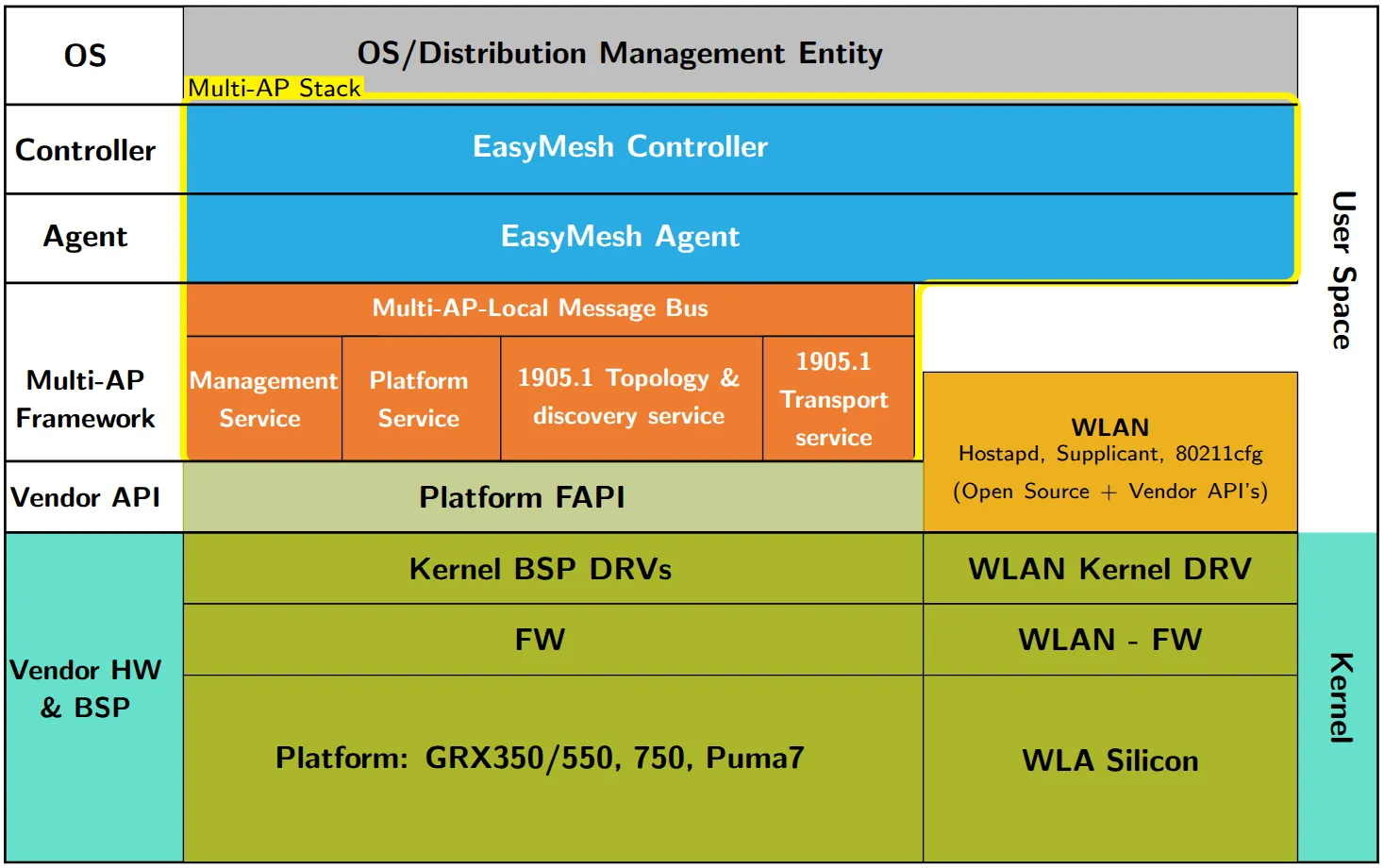
WFA EasyMesh High-Level Features
EasyMesh defines a common set of capabilities that every conformant multi-AP implementation must provide:
- On-boarding: A new “multi-AP” device entering the home gains Layer 2 connectivity.
- Discovery: A new “multi-AP” device establishes its role as Controller or Agent (Controlee).
- Configuration: A new “multi-AP” device receives the configuration for the home, e.g., SSID naming.
- Channel selection: Coordinated channel selection to minimize co-channel interference.
- Capability reporting: Understanding the capabilities of every other access point in the ecosystem.
- Link metric reporting: Quantifying link quality between access points.
- Client steering: Positioning clients on the most advantageous access point/band.
- Backhaul optimization: Providing robust inter-access-point links.
- Higher-layer data payload: An extensible transport for higher-layer data, enabling vendor- and application-specific extensions on top of the core protocol.
Architecture Analysis
Below is a detailed analysis of the architecture, traversing:

High-Level Architecture Diagram
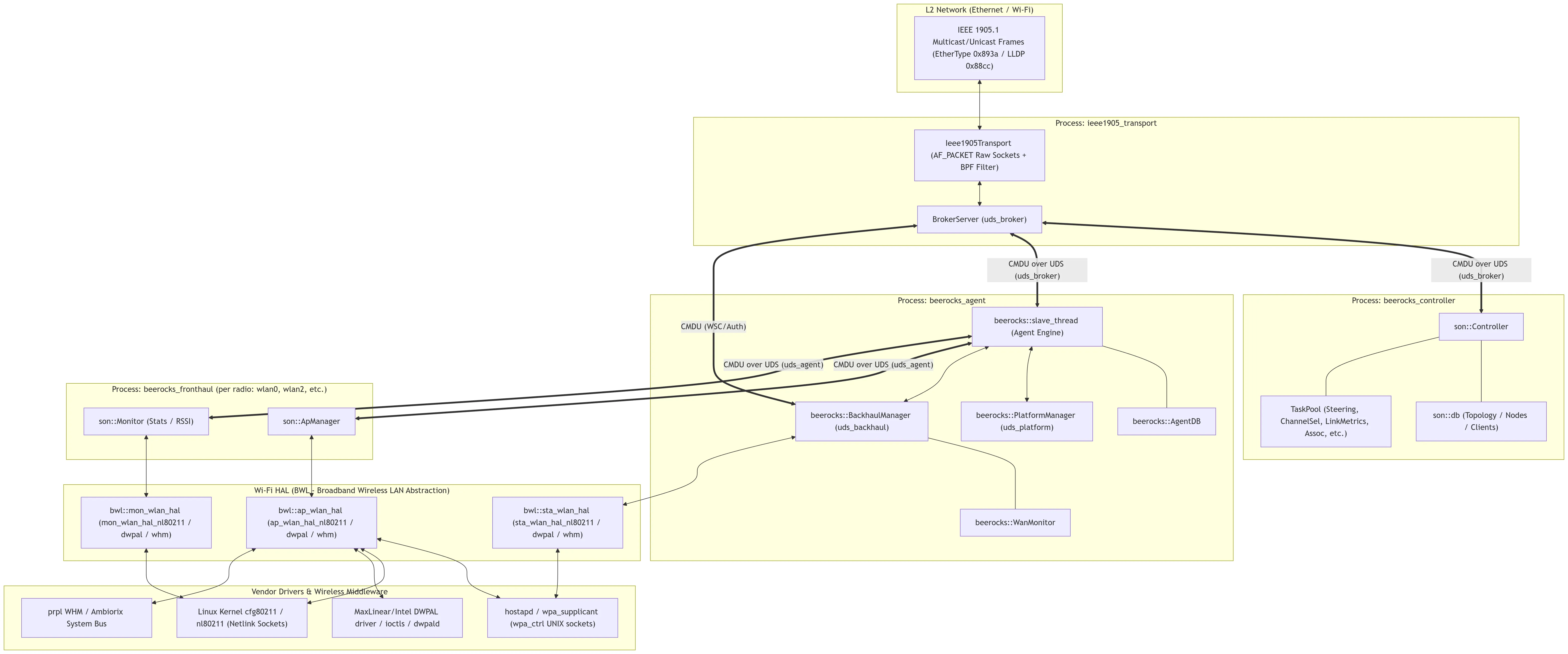
Layer-by-Layer Architecture & Components
Layer 1: IEEE 1905 Transport & TLVF Layer
- Role: Handles Layer 2 transport for IEEE 1905.1 Control Message Data Units (CMDUs). It isolates all networking protocol encoding/decoding and packet forwarding from the controller and agent business logic.
- Important Directories:
framework/transport/ieee1905_transport/— Daemon implementation.framework/tlvf/— TLV (Type-Length-Value) Serialization/Deserialization engine.framework/transport/include/mapf/transport/— Transport messaging definitions.
- Process:
ieee1905_transport - Main Classes:
beerocks::transport::Ieee1905Transport: ManagesAF_PACKETraw sockets on network bridges and Wi-Fi/Ethernet interfaces. Applies BPF (Berkeley Packet Filter) rules to capture EtherType0x893a(IEEE 1905.1) and0x88cc(LLDP). Handles packet fragmentation, duplicate detection, and relayed multicasting.beerocks::transport::broker::BrokerServer: Internal pub/sub message broker. Local processes connect via Unix Domain Sockets and register subscriptions for specific CMDU message types.ieee1905_1::CmduMessageRx/ieee1905_1::CmduMessageTx: TLVF auto-generated classes for parsing and building standard 1905 / Multi-AP messages and TLVs.
Layer 2: Multi-AP Controller
- Role: Central coordinator and decision-maker of the mesh network. Maintains global network topology, radio metrics, and client association states. Implements optimization policies such as client steering (BTM), dynamic channel selection, link metrics querying, and AP auto-configuration.
- Important Directories:
controller/src/beerocks/master/— Main controller logic (historically called “master”).controller/src/beerocks/master/tasks/— Finite state machine tasks.controller/src/beerocks/master/db/— Network data model and station database.controller/nbapi/— Northbound API (Ambiorix / ODL datamodels for TR-181).
- Process:
beerocks_controller - Main Classes:
son::Controller: Main controller engine. Connects touds_brokerviaBrokerClient, receives/dispatches CMDUs (handle_cmdu_1905_1_message), processes association notifications, and launches tasks.son::db: In-memory database of all mesh nodes, AP radios, BSSIDs, clients, capabilities, and link stats.- Tasks (
TaskPool):ClientSteeringTask&BtmRequestTask: Directs 802.11v BSS Transition Management client steering.OptimalPathTask: Computes the best AP/band path based on RSSI and PHY rate.ChannelSelectionTask: Radio channel planning and DFS clear handling.LinkMetricsTask: Periodically queries 1905 link metrics across agents.
Layer 3: Multi-AP Agent
- Role: Runs on every mesh node (gateway and extenders/IREs). Manages the local node’s radios, backhaul connection, and local fronthaul APs. Serves as the gateway between the 1905 transport broker and local radio processes.
- Important Directories:
agent/src/beerocks/slave/— Core agent engine (beerocks_agent_main.cpp,son_slave_thread.cpp).agent/src/beerocks/slave/platform_manager/— Platform manager interface.agent/src/beerocks/slave/tasks/— Agent-side tasks (e.g.,ap_autoconfiguration_task.cpp,agent_channel_scan_task.cpp).
- Process:
beerocks_agent - Main Classes:
beerocks::slave_thread: Event-loop worker thread. Connects touds_brokerfor 1905 messages and hosts theuds_agentserver for AP managers. Translates controller 1905 CMDUs into internal CMDU actions for AP managers.beerocks::AgentDB: Local database storing configured radios, active VAPs, backhaul status, and connected clients.beerocks::PlatformManager: Hostsuds_platformand queries platform settings (board configuration, operating system, serial numbers) via the BPL (Beerocks Platform Library).
Layer 4: Backhaul Manager
- Role: Manages the agent’s uplink connectivity (wired Ethernet vs. wireless backhaul station — bSTA). Handles dynamic backhaul selection, WSC onboarding (M1/M2/M8 exchange), backhaul roaming, and failover.
- Important Directories:
agent/src/beerocks/slave/backhaul_manager/— Backhaul manager and WAN monitor implementations.
- Thread/Process: Instantiated inside
beerocks_agentas a dedicatedEventLoopThread. - Main Classes:
beerocks::BackhaulManager: Coordinates onboarding state machines, bSTA scanning, connection establishment, WPS PBC triggering, and 4-address WDS link creation.beerocks::WanMonitor: Monitors wired Ethernet carrier states (link up/down) to determine whether wired backhaul is available.- Utilizes
bwl::sta_wlan_halto control the wireless backhaul station interface.
Layer 5: AP Manager (& Monitor)
- Role: Manages individual Wi-Fi radio chips and their virtual APs (VAPs/BSSs). Executes channel changes, configures BSS parameters, applies MAC ACLs for client steering/blacklisting, sends BTM steering requests, and monitors radio/station metrics.
- Important Directories:
agent/src/beerocks/fronthaul_manager/ap_manager/— AP configuration & event management.agent/src/beerocks/fronthaul_manager/monitor/— Client RSSI monitoring & channel load collection.agent/src/beerocks/fronthaul_manager/— Entry point (fronthaul_manager_main.cpp).
- Process:
beerocks_fronthaul -i <radio_interface>(one instance per physical Wi-Fi radio, e.g.,wlan0,wlan2). - Main Classes:
son::ApManager: Connects tobeerocks_agentoveruds_agent. Interfaces withbwl::ap_wlan_halto enforce channel switches (CSA), add/remove VAPs, send 802.11v BTM requests, and propagate station association/disassociation events.son::Monitor: Interfaces withbwl::mon_wlan_halto poll radio channel utilization and collect client RSSI/traffic stats.
Layer 6: Wi-Fi HAL (bwl - Broadband Wireless LAN)
- Role: Hardware abstraction layer that provides a uniform C++ interface for radio configuration, monitoring, and STA operations, shielding upper layers from driver/vendor specifics.
- Important Directories:
common/beerocks/bwl/include/bwl/— Abstract interfaces.common/beerocks/bwl/nl80211/— Generic Linux nl80211 & wpa_ctrl implementation.common/beerocks/bwl/dwpal/&dwpald/— Intel / MaxLinear DWPAL platform implementation.common/beerocks/bwl/whm/— prpl Wireless Hardware Manager (Ambiorix bus) implementation.common/beerocks/bwl/dummy/— Stub/mock HAL for testing and simulation.
- Main Classes:
- Abstract base interfaces:
bwl::base_wlan_hal: Base class defining attach/detach, event polling (process_ext_events,process_nl_events), and event dispatching (hal_event_cb_t).bwl::ap_wlan_hal: AP operations (set_channel,sta_allow/sta_deny,sta_disassoc,send_btm_req).bwl::mon_wlan_hal: Station and radio statistics polling.bwl::sta_wlan_hal: Station/bSTA connection, scanning, and WPS functions.
- Concrete implementations (e.g., for
nl80211):
- Abstract base interfaces:
Layer 7: Vendor Driver & Wireless Subsystem
- Role: Kernel drivers, firmware, and user-space wireless daemons that manage the physical Wi-Fi hardware.
- Interfaces & Protocols:
hostapd/wpa_supplicantControl Interface (wpa_ctrl): Communicates over UNIX domain sockets (/var/run/hostapd/<iface>) for AP management, WPS triggering, and 802.11v BSS Transition Management frames.- Linux
nl80211/cfg80211: Communicates via netlink generic sockets (NETLINK_GENERICvialibnl-3andlibnl-genl-3) directly to the kernel for channel survey info, radio capabilities, and station dump stats. - Vendor HAL APIs (e.g., DWPAL /
libdwpal.so): Direct library and ioctl calls into vendor wireless drivers (such as Intel WAVE / MaxLinear Wi-Fi chipsets). - prpl WHM (Wireless Hardware Manager): Ambiorix RPCs over ubus/PCB to interact with platform Wi-Fi services in OpenWrt / prplOS.
Multi-AP Deployment Modes
To support flexible deployments that meet different customer needs, the Multi-AP stack defines four deployment modes: EasyMesh Managed Mode, EasyMesh Unmanaged Mode, Non-Mesh Managed Mode, Non-Mesh Unmanaged Mode
EasyMesh Managed Mode
This is the full Multi-AP mode, where the framework — 1905.1 plus the BeeRocks agent and controller — is fully deployed. Communication between components is carried over the XSub/XPub local bus.
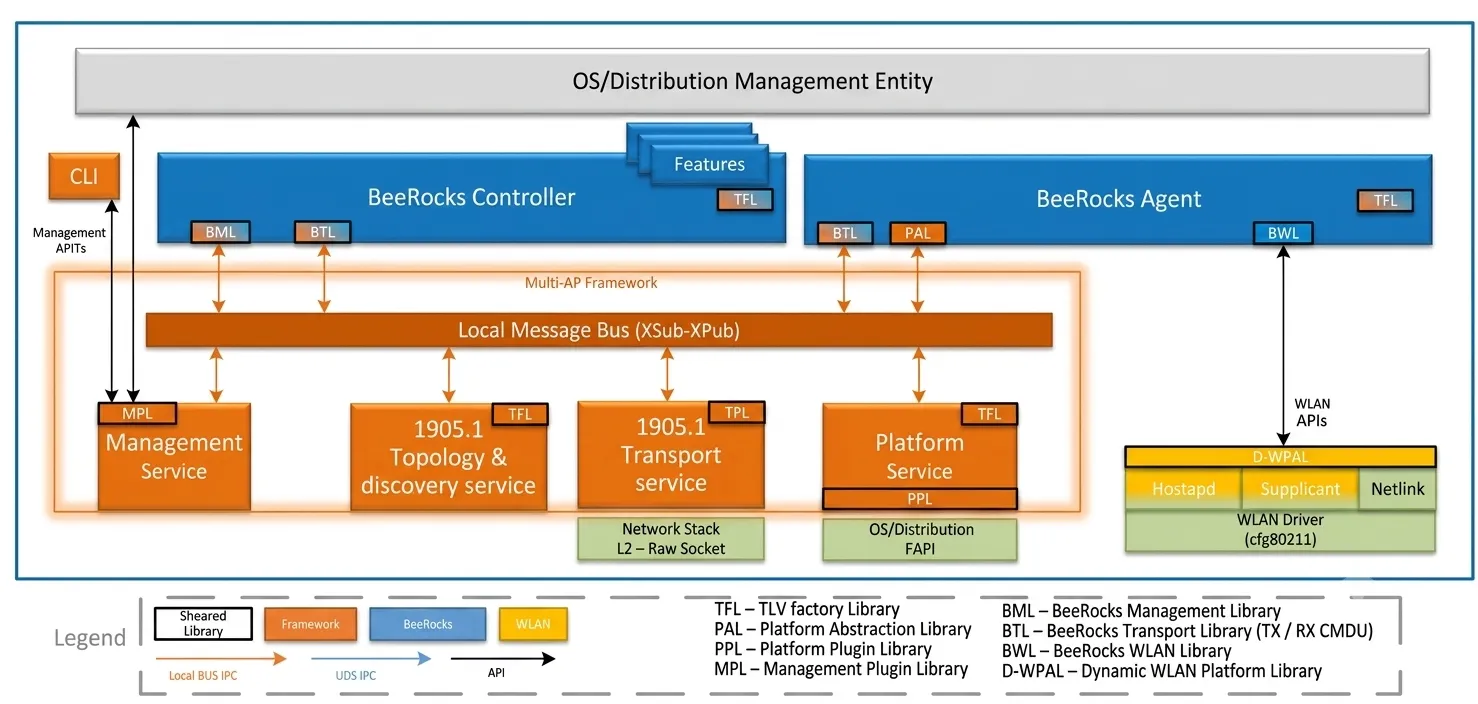
EasyMesh Unmanaged Mode
This mode is identical to EasyMesh Managed Mode except that the controller is not deployed. It assumes an external controller is attached to the local bus, or is otherwise external to the stack.
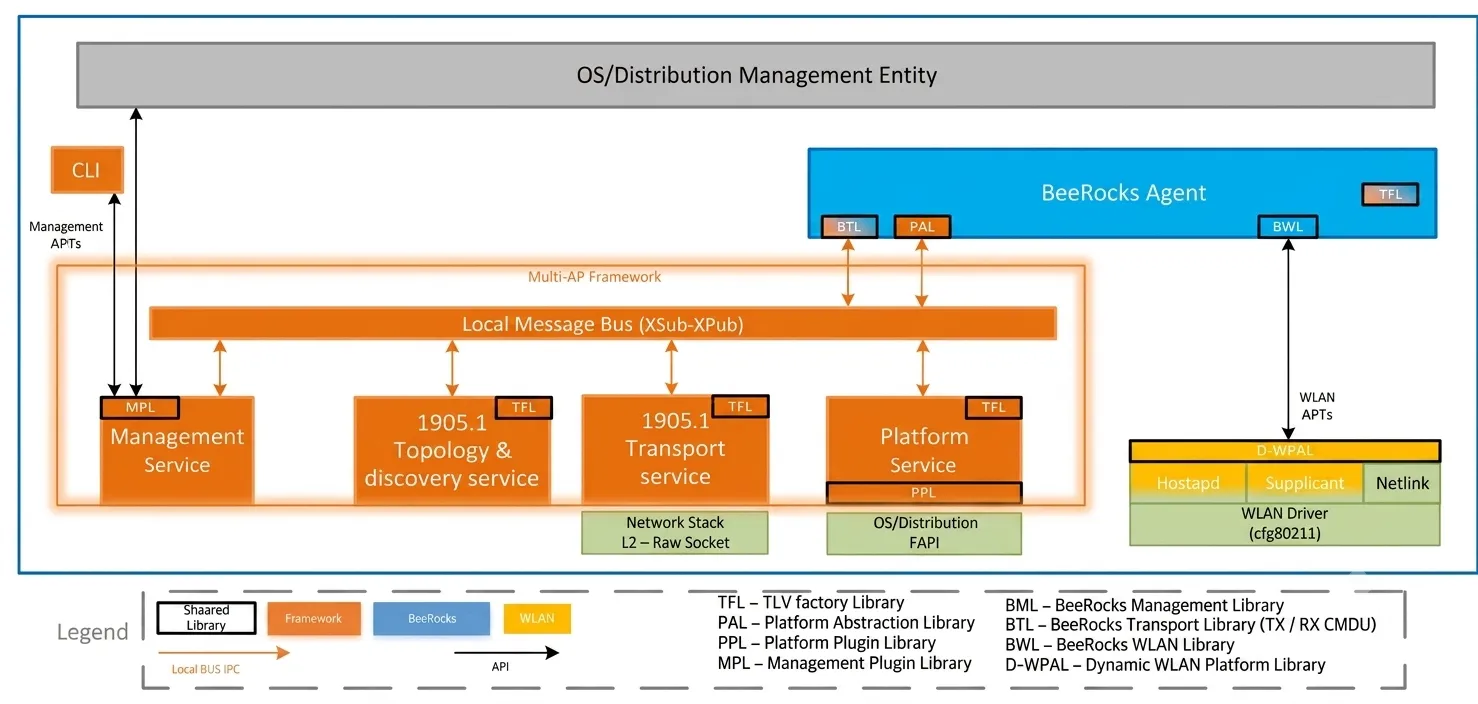
Non-Mesh Managed Mode
This mode allows a non-mesh deployment in which the 1905.1 components are not deployed. The BeeRocks controller manages the gateway’s local radios according to enabled features. In cases where an upper-layer controller operates alongside the BeeRocks controller, the enabled features of each must not create contention.
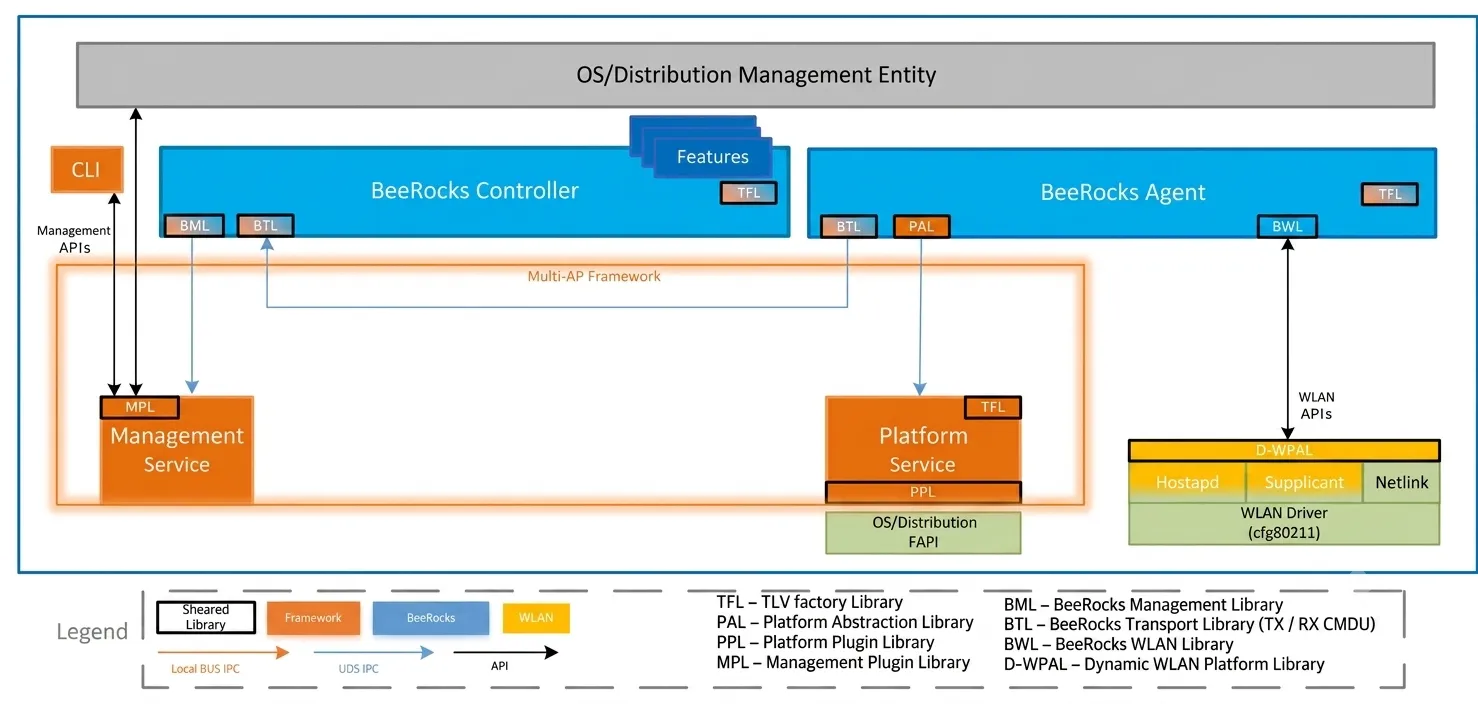
Non-Mesh Unmanaged Mode
This mode is identical to Non-Mesh Managed Mode except that the controller is not deployed. It allows an external entity to configure the agent and to receive statistics and events from the agent.
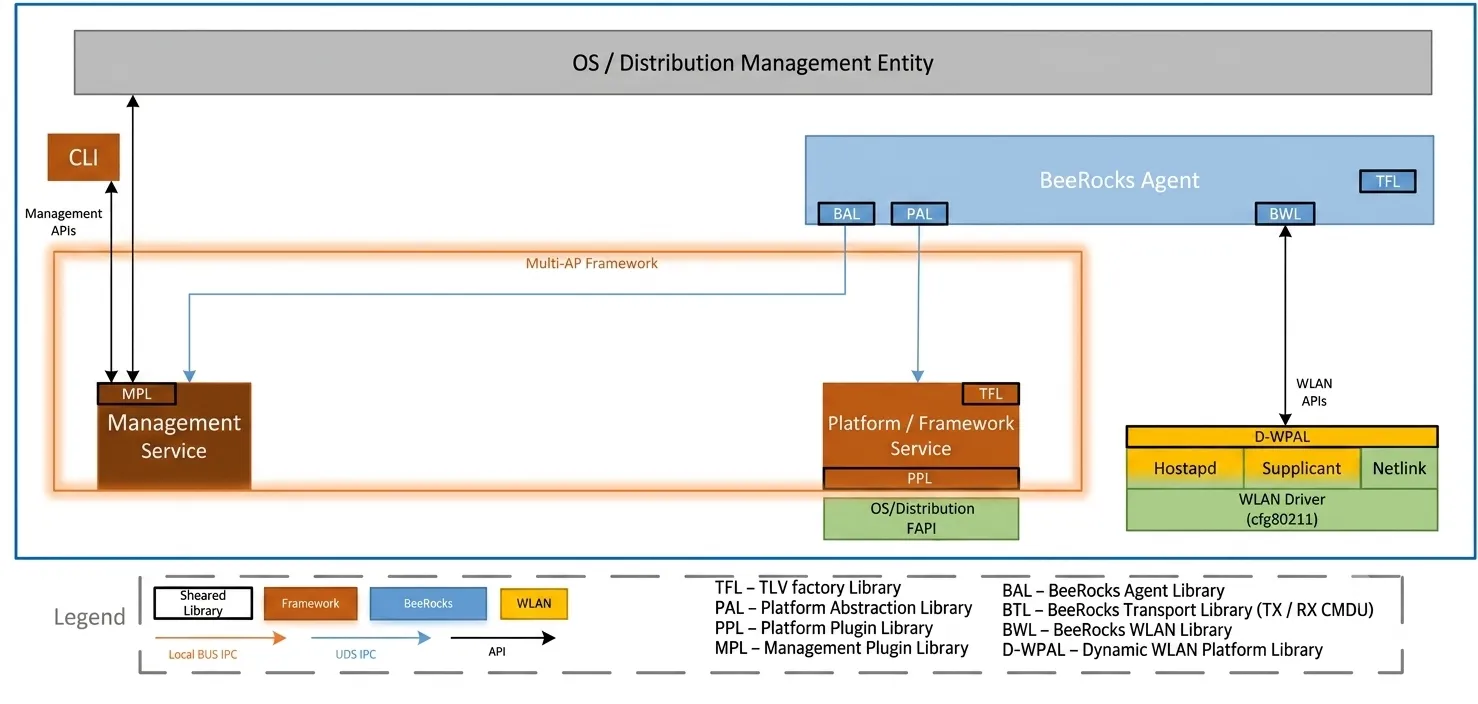
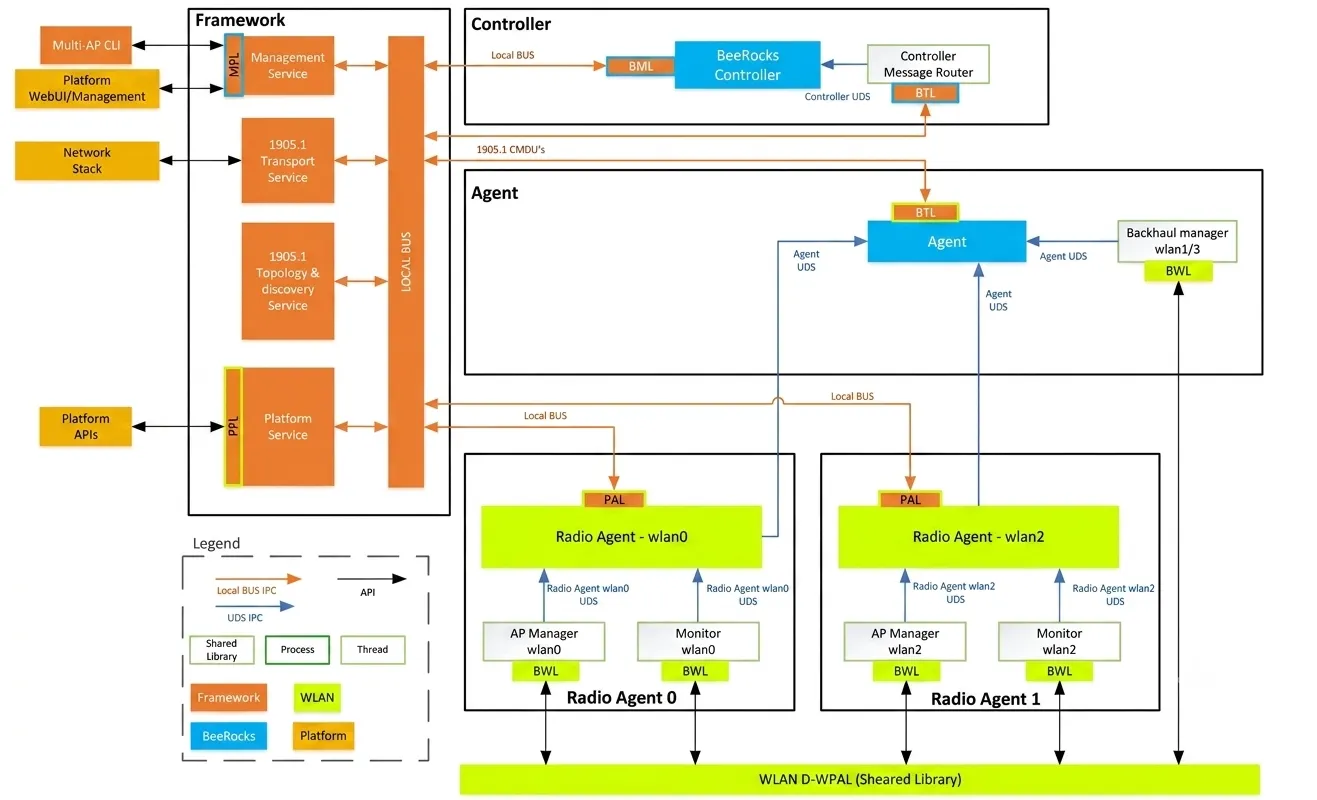
Inter/Outer Communication (IPC)
The figure below shows all internal module IPC communication of the Multi-AP stack and BeeRocks when EasyMesh mode is deployed:
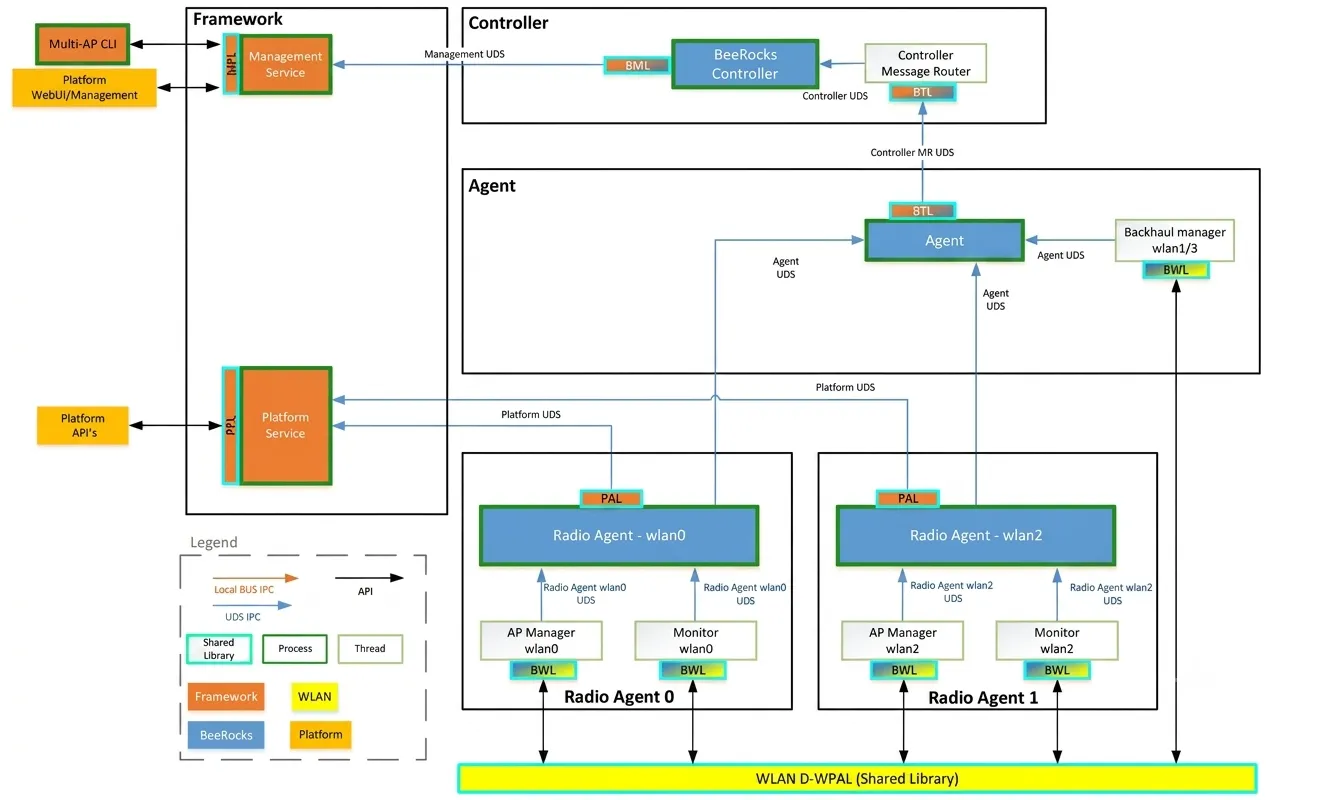
For the Non-Mesh mode, where the local bus and 1905.1 are not deployed, communication is carried over point-to-point UDS connections, carrying the same vendor-specific CMDUs:
IPC Mechanisms & Sockets Summary
prplMesh utilizes distinct IPC mechanisms suited to each communication boundary:
| IPC Type | Socket / Interface Identifier | Endpoints | Purpose |
|---|---|---|---|
| Unix Domain Socket (UDS) | /tmp/beerocks/uds_broker | ieee1905_transport Controller, Agent, Backhaul Manager, Vendor Message | Pub/Sub message broker for dispatching IEEE 1905.1 CMDUs |
| Unix Domain Socket (UDS) | /tmp/beerocks/uds_agent | beerocks_agent beerocks_fronthaul (AP Manager / Monitor) | Internal CMDU commands for VAP control, steering, and events |
| Unix Domain Socket (UDS) | /tmp/beerocks/uds_platform | PlatformManager Agent, Backhaul Manager, BML | Platform queries (serial numbers, interfaces, modes) |
| Unix Domain Socket (UDS) | /tmp/beerocks/uds_backhaul | BackhaulManager Agent | Backhaul status and coordination |
| Unix Domain Socket (UDS) | /tmp/beerocks/uds_controller | beerocks_controller beerocks_cli / BML | Controller CLI and management RPCs |
Raw Sockets (AF_PACKET) | SOCK_RAW on interfaces/bridges | ieee1905_transport Physical Network | IEEE 1905.1 (0x893a) & LLDP (0x88cc) packet capture/injection with BPF |
| UNIX Datagram Sockets | wpa_ctrl sockets | ap_wlan_hal_nl80211 / sta_wlan_hal_nl80211 hostapd / wpa_supplicant | Hostapd command requests and unsolicited event listener |
Netlink Sockets (AF_NETLINK) | NETLINK_GENERIC (nl80211) | base_wlan_hal_nl80211 / nl80211_client Linux Kernel cfg80211 | Channel surveys, station bitrate dump, interface config |
| System Bus / IPC | Ambiorix (amxb / ubus / PCB) | Controller / Agent TR-181 Data Model / WHM | Northbound API management and platform abstraction |
Controller
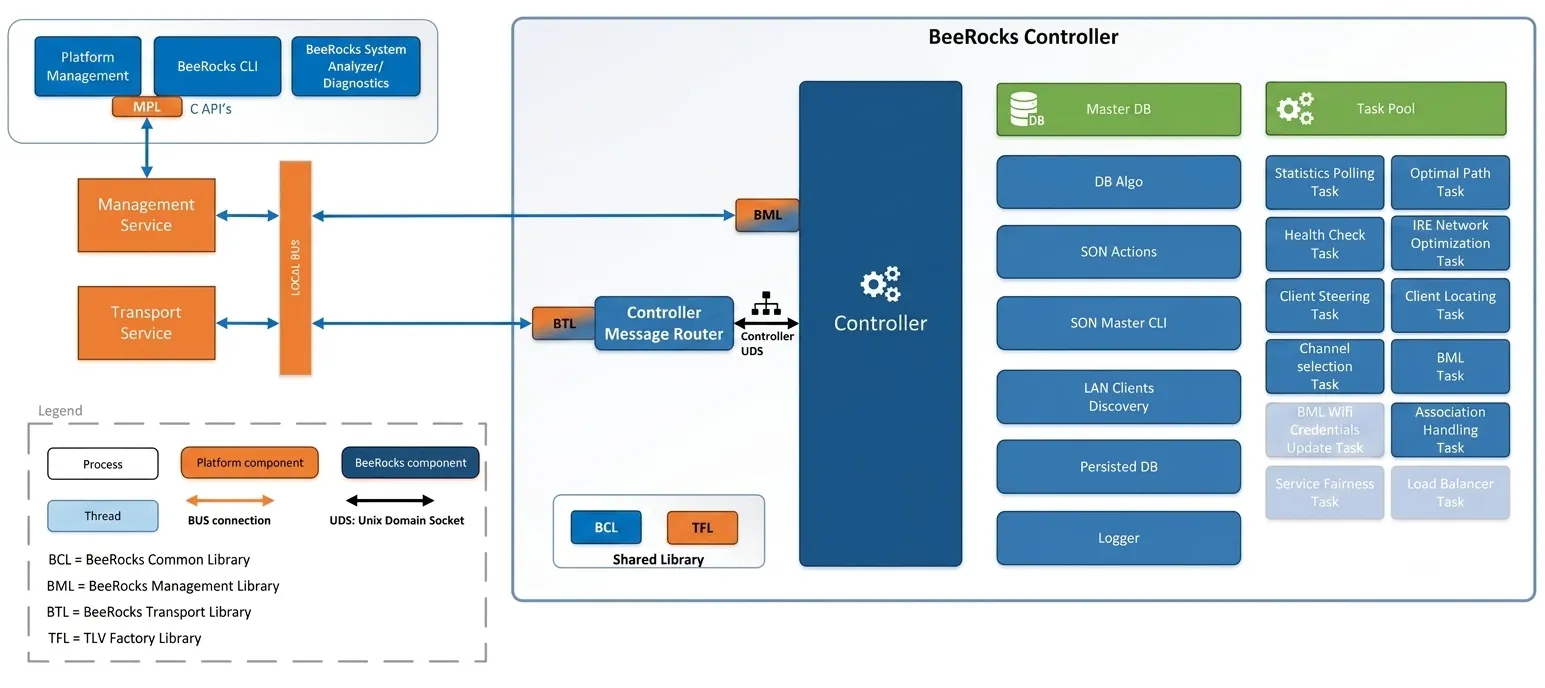
The BeeRocks controller retains its current architecture with respect to module and task structure, and introduces a new transport library (BTL) that lets the controller communicate with the local 1905.1 transport agent over the local message bus. This library integrates with the existing controller message router module. The transport library is shared by the controller and agent, providing abstraction from the platform-specific implementation.
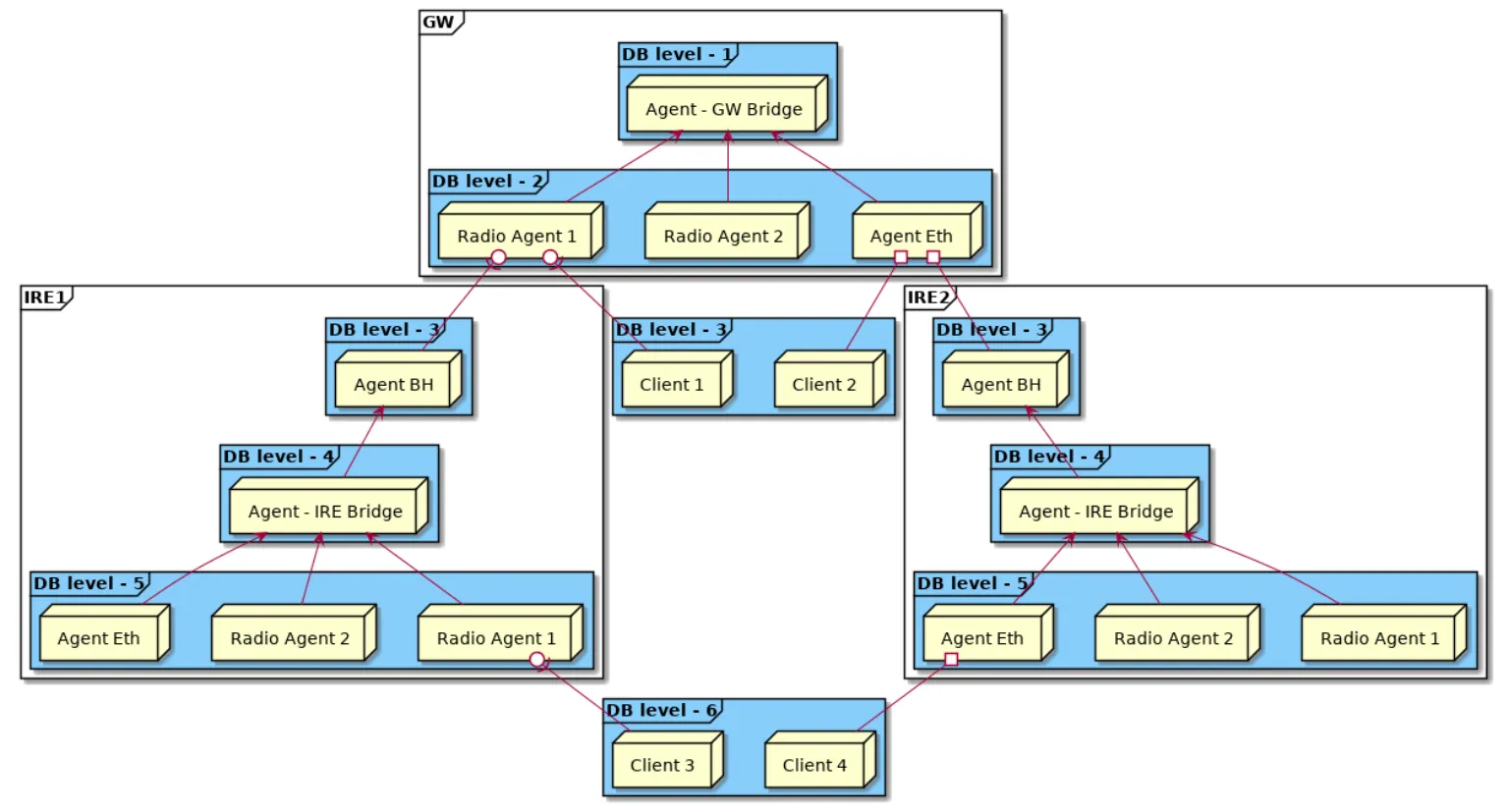
Controller Database Structure
Agent
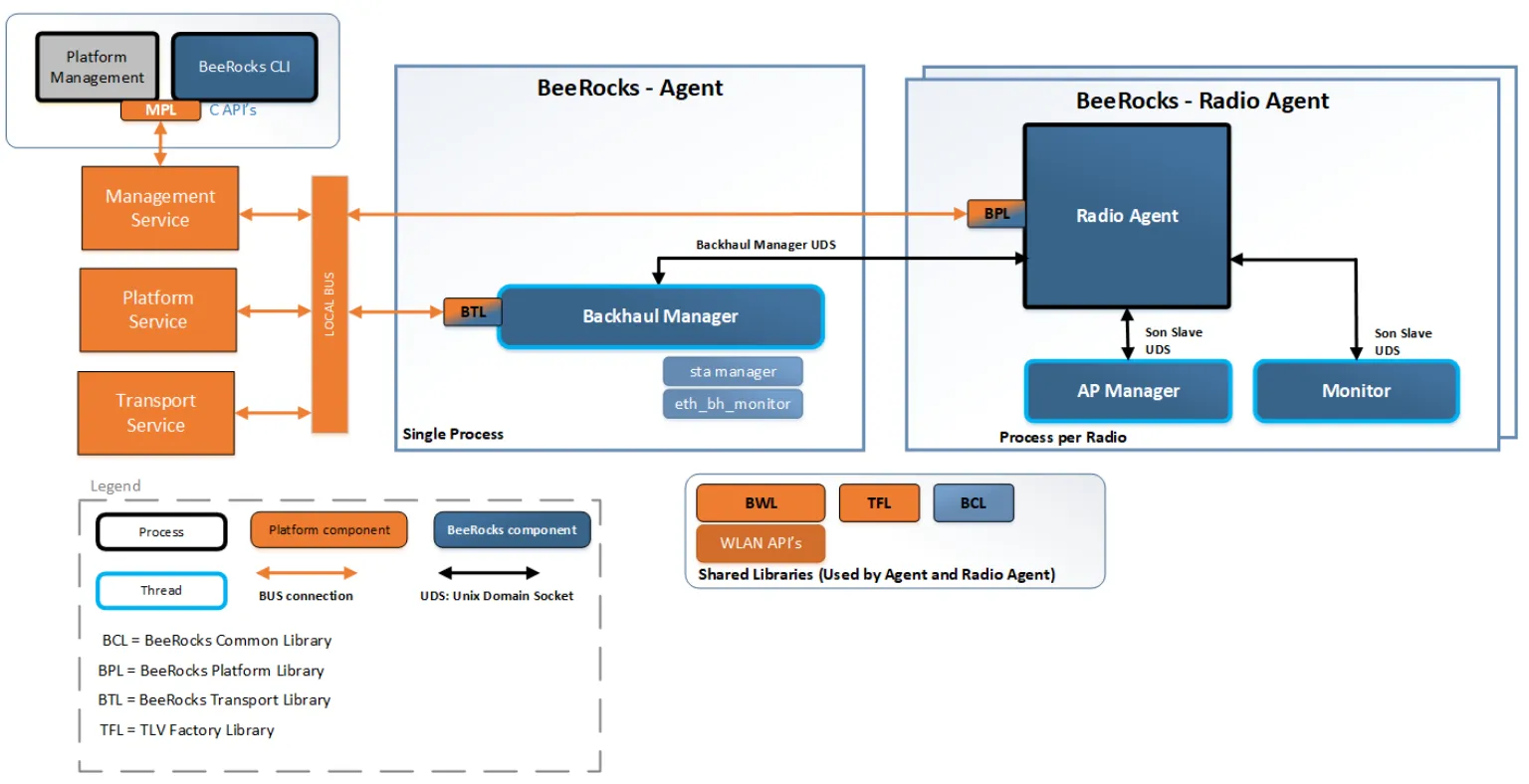
Similar to the BeeRocks controller, the agent integrates the new BeeRocks Transport Library (BTL), which enables communication with the platform’s 1905.1 stack or an alternative transport service. All agent-specific APIs are moved to a new library named the BeeRocks Agent Library (BAL). This allows the agent to be independent of the controller, aligning with the requirement for separate packaging of controller and agent.
Flows
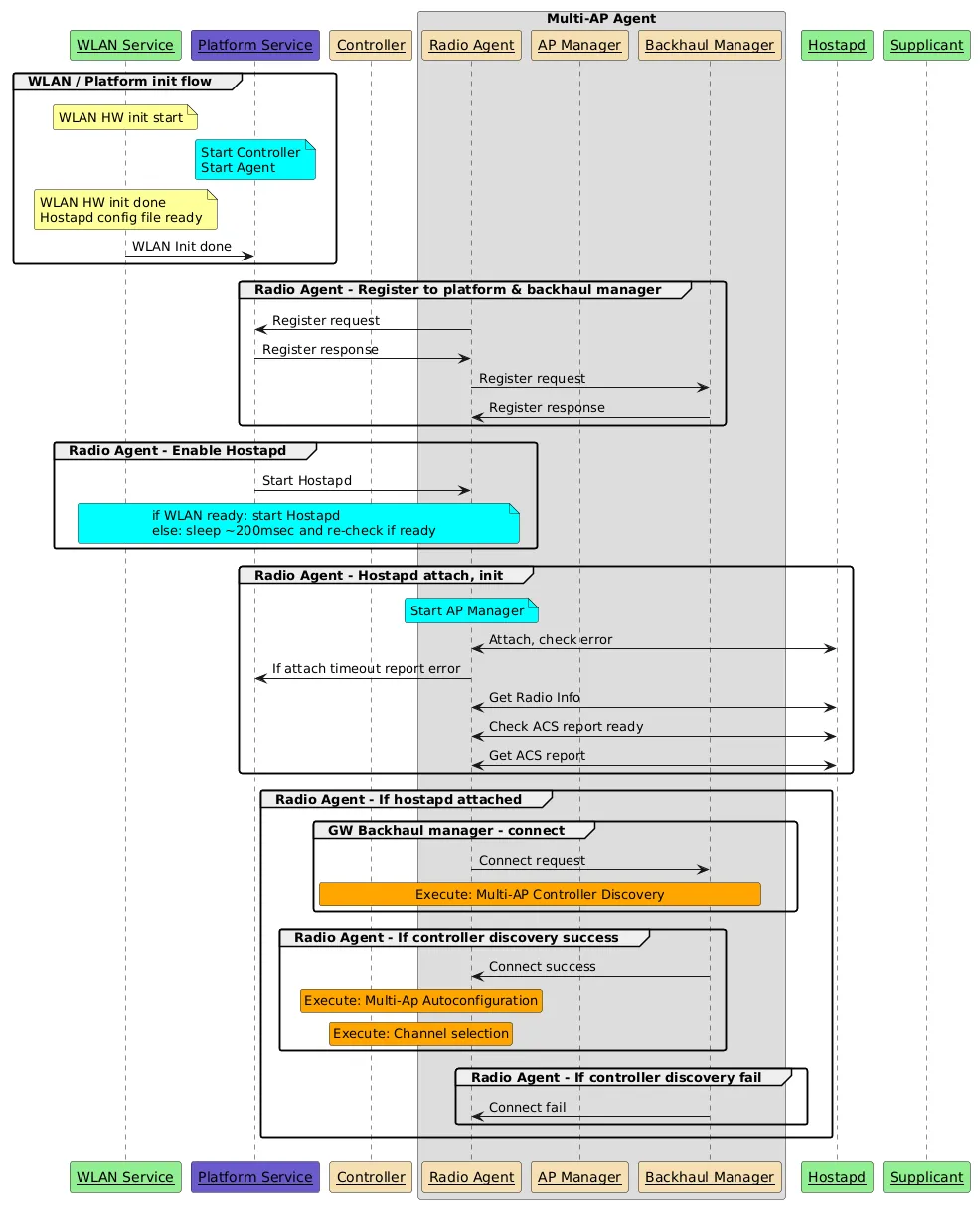
GW Boot
The following high-level flow diagram describes the GW boot flow, including the interaction between the different entities in the system.
End-to-End Control & Communication Flows
Flow A: Client Association & Roaming Decision (Uplink Event Flow)
- Vendor Driver → Wi-Fi HAL: A client associates to an AP.
hostapdemits an association event overwpa_ctrl. - Wi-Fi HAL → AP Manager:
bwl::ap_wlan_hal_nl80211parses the event and invokesApManager::hal_event_handlerwithEvent::STA_Connected. - AP Manager → Agent:
ApManagerpacks acACTION_APMANAGER_CLIENT_ASSOCIATED_NOTIFICATIONCMDU and sends it overuds_agenttobeerocks_agent. - Agent → Transport Broker:
beerocks::slave_threadconstructs a 1905 Topology Notification / Client Association Event CMDU and sends it overuds_brokertoieee1905_transport. - Transport → Controller:
ieee1905_transporttransmits the frame via a raw socket over Ethernet/Wi-Fi to the controller’s transport daemon, which routes it overuds_brokertoson::Controller. - Controller Execution:
son::Controllerupdatesson::dband triggersAssociationHandlingTask/OptimalPathTask.
Flow B: Client Steering / BTM Request (Downlink Control Flow)
- Controller:
ClientSteeringTaskdetermines that a station should steer to another BSSID and generates a Multi-AP Client Steering Request CMDU. - Controller → Transport → Agent: The CMDU is delivered via
uds_broker→ raw socket → the target node’sieee1905_transport→uds_broker→beerocks::slave_thread. - Agent → AP Manager:
slave_threaddecodes the CMDU and forwards the BTM request overuds_agentto the correspondingson::ApManager. - AP Manager → Wi-Fi HAL:
ApManagerinvokesbwl::ap_wlan_hal::send_btm_req(). - Wi-Fi HAL → Vendor Driver:
bwl::nl80211::ap_wlan_hal_nl80211sends aBSS_TM_REQcommand over thewpa_ctrlsocket tohostapd, which transmits the 802.11v BSS Transition Management request frame over the air to the client station.
Band Steering
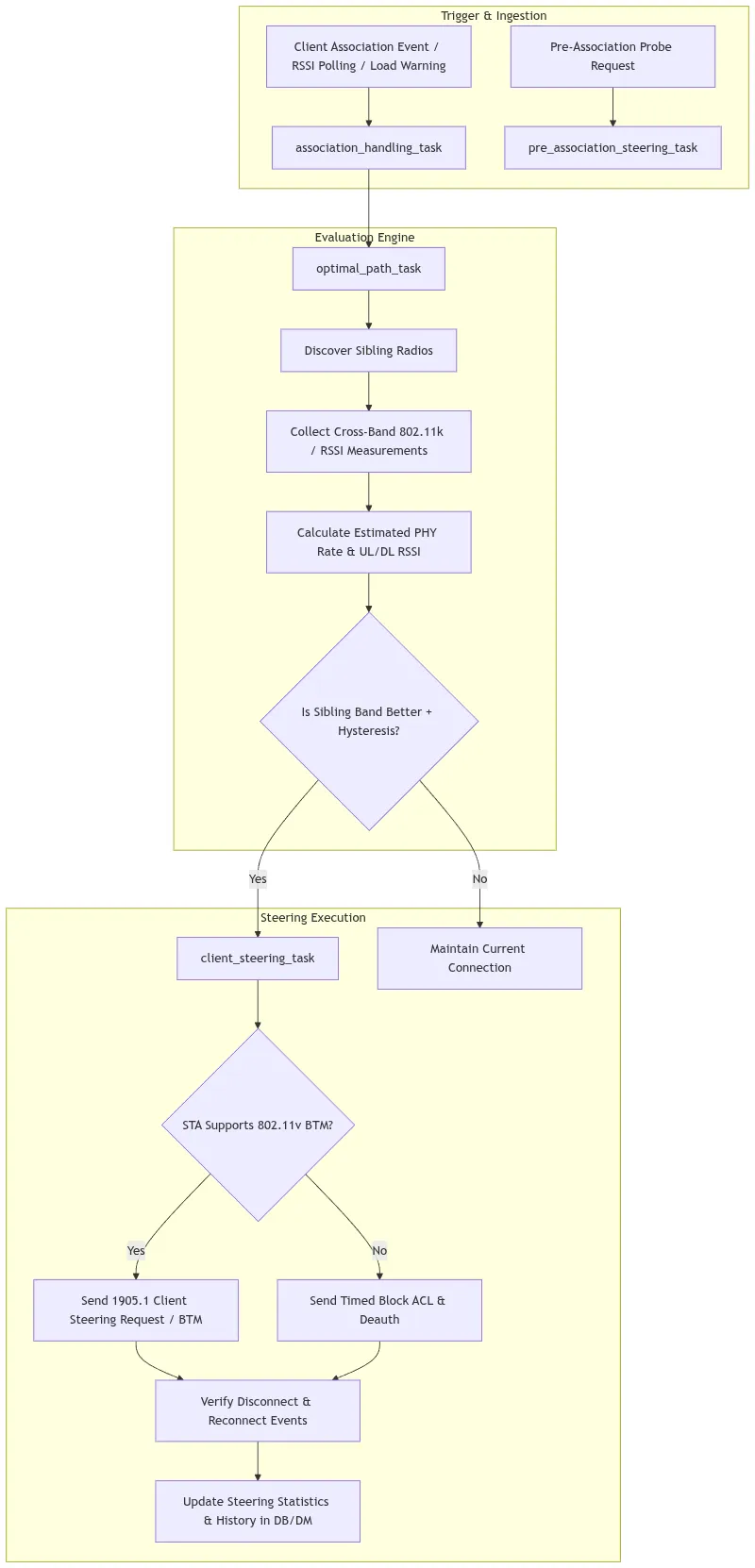
Band Steering is a wireless resource management feature designed to steer multi-band Wi-Fi client stations (STAs) to the most optimal frequency band (e.g., 2.4 GHz, 5 GHz, or 6 GHz) on an Access Point (AP). In prplMesh (an open-source implementation of the Wi-Fi Alliance EasyMesh standard), Band Steering is implemented as part of the centralized controller optimization architecture, closely integrated with roaming and path-selection algorithms.
| Frequency Band | Advantages | Limitations |
|---|---|---|
| 2.4 GHz | Long range, superior wall/obstacle penetration. | High channel congestion, limited spectrum (three non-overlapping 20 MHz channels), lower peak data rates. |
| 5 GHz | Wider channels (up to 80/160 MHz), higher PHY rates, less RF interference and contention. | Shorter range, higher path loss and wall attenuation. |
| 6 GHz (Wi-Fi 6E/7) | Massive clean spectrum, ultra-wide 160/320 MHz channels, no legacy contention. | Highest attenuation, requires Wi-Fi 6E/7 client support and PSC scanning. |
Key Tasks and Roles
- The primary decision engine for client path optimization.
- When
settings_client_band_steering()is enabled, it queriesdatabase.get_radio_siblings()and appends sibling radios to the candidate list. - Evaluates link metrics, PHY rate calculations, RSSI cutoff thresholds, and hysteresis bonuses.
- Triggers immediately after a client connects or completes a handoff.
- Queries 802.11k beacon capabilities, measures initial uplink RSSI, and automatically spawns
optimal_path_taskto evaluate if the client connected on the suboptimal band.
- Manages the execution of the steering command across Multi-AP agents using IEEE 1905.1 control messages.
- Unblocks the target BSSID, issues 802.11v BTM mandates or legacy association control blocks, and monitors disconnection/reconnection status.
pre_association_steering_task& Agent HAL Monitor
- Implements pre-association probe response suppression.
- Suppresses 2.4 GHz Probe Responses or Authentication Responses for dual-band STAs with high SNR to compel them to associate with 5 GHz initially.
- Cooperates with Band Steering during DFS (Dynamic Frequency Selection) radar events or CAC (Channel Availability Check) to steer STAs safely down to 2.4 GHz before clearing 5 GHz channels.
Decision Algorithm & Path Selection
Sibling Discovery & Compatibility Check
- The
optimal_path_taskchecks STA capabilities against candidate sibling radios: - Verifies 2.4 GHz, 5 GHz, and 6 GHz capabilities (
get_sta_24ghz_support,get_sta_5ghz_support,get_sta_6ghz_support). - Ensures candidate VAP shares the matching SSID.
- Filters out inactive radios or radios undergoing channel selection.
Metric Computation & Hysteresis
-
Link quality is evaluated based on either:
-
Estimated PHY Rate (Default): Derived from channel bandwidth (20/40/80/160 MHz), modulation coding scheme (MCS), spatial streams (NSS), and estimated DL/UL RSSI.
-
Signal Strength (RSSI): When
OptimalPathPreferSignalStrengthis enabled. -
To prevent rapid oscillation (ping-pong effect) between bands:
Cutoff Threshold Logic
- 5 GHz to 2.4 GHz Fallback: If the client’s estimated uplink/downlink RSSI on 5 GHz drops below
roaming_rssi_cutoff_db(e.g. ), 5 GHz is deemed unusable and 2.4 GHz is selected. - 2.4 GHz to 5 GHz Upsteering: If 5 GHz estimated RSSI is safely above
roaming_rssi_cutoff_db+ hysteresis, 5 GHz is preferred.
Steering Execution Mechanisms
prplMesh supports two steering mechanisms depending on the client’s 802.11 standards compliance:
                                  Client Steering
                                         │
                    ┌────────────────────┴────────────────────┐
                    ▼                                         ▼
         802.11v BSS Transition                     Legacy Steering
            (BTM Supported)                       (Non-11v Supported)
                    │                                         │
        ┌───────────┴───────────┐                 ┌───────────┴───────────┐
        │ 1. Unblock Target BSS │                 │ 1. Unblock Target BSS │
        │ 2. Send 1905.1 BTM    │                 │ 2. Set Timed Block on │
        │    Steering Request   │                 │    Source BSS (ACL)   │
        │ 3. Client roams       │                 │ 3. Disassoc / Deauth  │
        │    seamlessly         │                 │ 4. Client reconnects  │
        └───────────────────────┘                 └───────────────────────┘
802.11v BSS Transition Management (BTM)
- Sends Multi-AP
CLIENT_STEERING_REQUEST_MESSAGEwithtlvSteeringRequest. - Sets
request_mode = STEERING_MANDATE. - Populates target BSSID, target channel number, target operating class, and disassociation timer (
SteeringDisassociationTimerMSec). - The serving AP transmits an IEEE 802.11v BTM Request frame to the station.
Legacy Client Steering (Association Control & Timed Block)
- Sends Multi-AP
Client Association Control RequestwithTIMED_BLOCKto blacklist the client on non-target BSSIDs for a configurable duration (STEERING_WAIT_TIME_MS). - Sends Multi-AP
Client Association Control RequestwithUNBLOCKon the target BSSID. - Forces disassociation, leaving the target band as the only available BSSID for reconnection.
Configuration Parameters
The following parameters in the Controller DataModel (X_PRPLWARE-COM_Controller.Configuration) and platform configuration files control Band Steering:
| Parameter | Type | Default | Description |
|---|---|---|---|
BandSteeringEnabled | bool | false | Master toggle to enable/disable Band Steering in the controller. |
OptimalPathPreferSignalStrength | bool | false | If true, steering decisions prioritize RSSI; if false, prioritizes estimated PHY rate. |
RoamingHysteresisPercentBonus | uint32 | 10 | Percentage bonus added to the current BSS score to prevent ping-pong oscillation. |
SteeringDisassociationTimerMSec | uint32 | 200 | Disassociation timer in milliseconds included in 802.11v BTM requests. |
roaming_rssi_cutoff_db | int32 | -80 | Uplink RSSI threshold below which 5 GHz is deemed unusable, triggering fallback to 2.4 GHz. |
roaming_sticky_client_rssi_threshold | int32 | -80 | RSSI threshold where steering flags disassociation as imminent. |
SteeringPolicy | uint32 | 0 | Multi-AP steering policy flags sent to Agents. |
Telemetry & Statistics
prplMesh tracks steering outcomes across the network in DataModel objects (DataElements.Network.MultiAPSteeringSummaryStats and MultiAPSTA.SteeringSummaryStats):
BTMSuccesses/BTMFailures: Tracks outcomes of 802.11v BTM steering attempts.BlacklistSuccesses/BlacklistFailures: Tracks outcomes of legacy ACL-based steering attempts.NoCandidateAPFailures: Incremented when no candidate BSS satisfies criteria.failed_5ghz_steer_attempt/failed_24ghz_steer_attempt/failed_6ghz_steer_attempt: Per-station counters to prevent repeated failed steering attempts toward incompatible bands.
Load Balancing
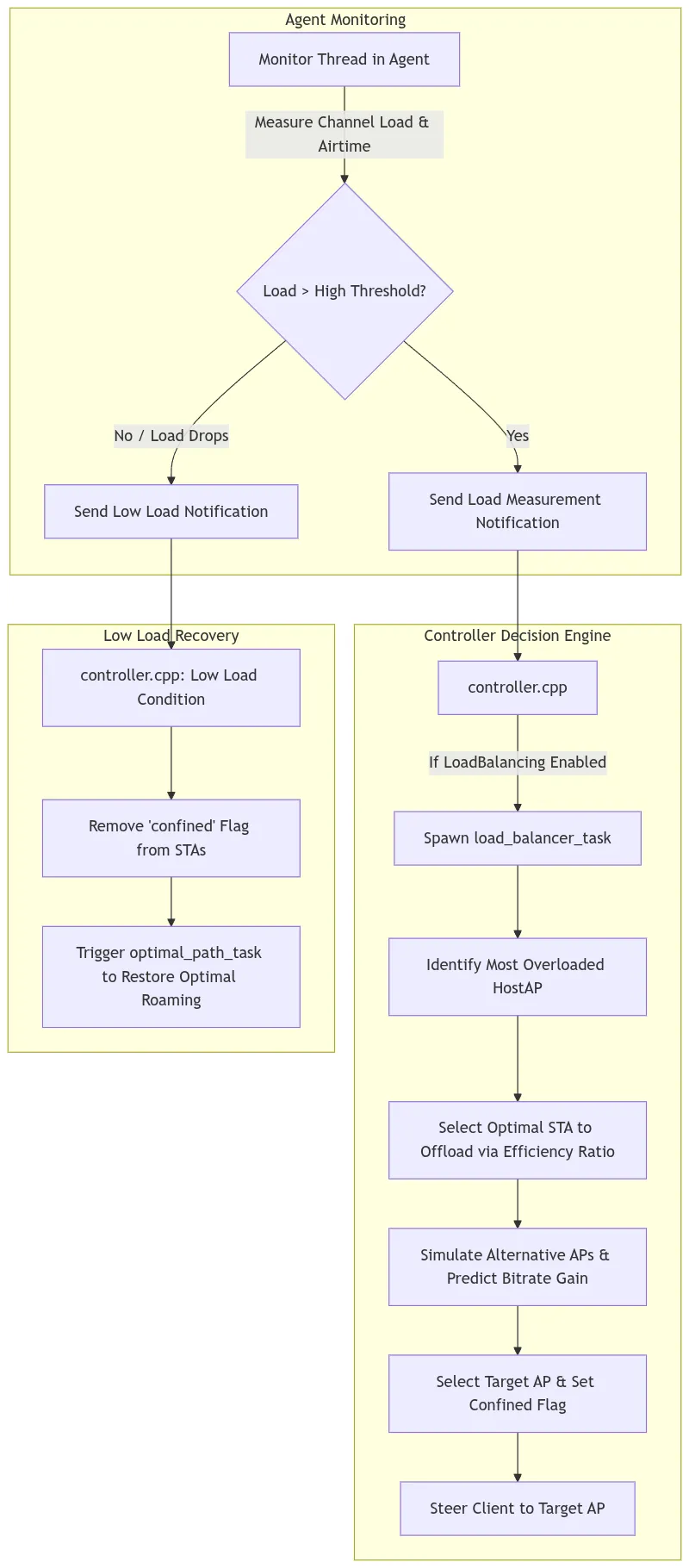
Load Balancing in prplMesh is a centralized radio resource management mechanism designed to prevent and relieve congestion across access points (APs) and frequency bands in a Multi-AP Wi-Fi mesh network. When multiple client stations (STAs) congregate on a single AP or radio (e.g., the 5 GHz band of the main Gateway), channel utilization and airtime contention increase, reducing overall network performance. Load balancing detects these congested conditions and intelligently offloads selected clients to less busy neighbor APs or radios.
Triggering Mechanism
Load balancing operates on an event-driven model between the Agent and the Controller:
- Agent-Side Monitoring (monitor_stats.cpp:390-440): • The Agent periodically tracks channel utilization (channel_load_percent), active STA counts, and per-STA TX/RX airtime consumption. • When active clients exceed monitor_min_active_clients or the load delta crosses conf_client_load_notification_delta_th_percent, the Agent transmits an ACTION_CONTROL_HOSTAP_LOAD_MEASUREMENT_NOTIFICATION CMDU to the Controller.
- Controller-Side Evaluation (controller.cpp:4378-4435): • High Load Trigger: If client_load_percent > monitor_total_ch_load_notification_hi_th_percent and active_client_count > monitor_min_active_clients, the Controller spawns a load_balancer_task.cpp. • Low Load Recovery: If load drops below monitor_total_ch_load_notification_lo_th_percent, the Controller clears confinement flags on previously offloaded STAs, allowing them to roam back.
Step-by-Step Operation of load_balancer_task
The load_balancer_task.cpp executes an optimization algorithm:
Step 1: Identify the Most Loaded Radio
The task queries updated statistics (ACTION_CONTROL_HOSTAP_STATS_MEASUREMENT_REQUEST) for all candidate radios and identifies the radio with the maximum channel_load_percent (or highest STA count in case of equal load).
Step 2: Select the Client to Offload (Efficiency Ratio Metric)
Rather than picking a random client, prplMesh calculates a Client Efficiency Ratio on the congested radio:
                          ⎛   PHY Rate   ⎞
Efficiency Ratio ≈   ∑    ⎜──────────────⎟ × Traffic Share
TX, RX ⎝Actual Bitrate⎠- On a 5 GHz Radio: The task targets the least efficient client (typically a client with high airtime consumption but degraded MCS/PHY rate due to distance). Offloading this client frees up disproportionately large airtime for the remaining high-rate STAs.
- On a 2.4 GHz Radio: The task targets the most capable client that can achieve better performance on an alternative radio/band.
Step 3: Simulate Alternative Target APs
For the chosen client, the algorithm iterates over candidate neighbor APs/radios:
- Checks capability compatibility (e.g., ensuring 5 GHz is only targeted if the STA supports 5 GHz).
- Uses cross-band/cross-radio RSSI and PHY rate estimation (wireless_utils::estimate_ul_params) to predict the client’s throughput on the alternative AP.
- Selects the target AP that maximizes predicted bitrate and network throughput.
Step 4: Client Confinement (confined Flag)
When a client is moved to an AP/band that might have lower raw RSSI than its original AP solely for load balancing reasons:
- The controller sets client->confined = true.
- Purpose: In optimal_path_task.cpp:94-97, if a station is marked as confined, the optimal path task immediately aborts. This prevents the normal roaming algorithm from immediately steering the client back to the congested AP (preventing ping-pong loops).
Step 5: Confinement Release & Restoration
When the overloaded AP’s load drops below monitor_total_ch_load_notification_lo_th_percent:
- The controller resets client->confined = false.
- It spawns optimal_path_task.cpp (load notif (low) - optimal_path) to naturally re-evaluate and roam the client back to its highest-performing link.
Key Configuration Parameters
Configurable via DataModel (X_PRPLWARE-COM_Controller.Configuration) or platform configuration files:
| Parameter | Type | Default | Description |
|---|---|---|---|
| LoadBalancingTaskEnabled | bool | false | Master toggle to enable/disable load balancing in the controller. |
| monitor_min_active_clients | uint32 | Platform-defined | Minimum number of active clients required on an AP before load balancing activates. |
| monitor_total_ch_load_notification_hi_th_percent | uint32 | Platform-defined | High channel load threshold (%) triggering the load balancer. |
| monitor_total_ch_load_notification_lo_th_percent | uint32 | Platform-defined | Low channel load threshold (%) triggering relaxation and removal of client confinement. |
| conf_client_load_notification_delta_th_percent | uint32 | Platform-defined | Threshold for change in STA airtime load before sending an updated load notification. |
Source Code
Source Tree Key Directories
prplMesh-6.0.0/
├── ci/                            # Continuous integration, certification scripts, boardfarm configs
├── common/beerocks/               # Common core infrastructure
│   ├── bcl/                       # Beerocks Common Library (EventLoop, CMDU server/client, sockets, timers)
│   ├── bwl/                       # Broadband Wireless LAN HAL (interfaces, nl80211, dwpal, whm, dummy)
│   └── tlvf/                      # Common TLVF headers and message structures
├── controller/                    # Multi-AP Controller
│   ├── src/beerocks/master/       # Controller core engine (Controller, son::db, tasks)
│   ├── src/beerocks/master/tasks/ # Controller algorithmic FSM tasks (steering, optimal path, etc.)
│   ├── nbapi/                     # Northbound API (Ambiorix data models)
│   └── src/beerocks/cli/          # CLI management interface
├── agent/                         # Multi-AP Agent
│   ├── src/beerocks/slave/        # Agent core engine (slave_thread, AgentDB, tasks)
│   │   ├── backhaul_manager/      # Backhaul selection, onboarding, WAN monitor
│   │   └── platform_manager/      # Platform capabilities manager
│   └── src/beerocks/fronthaul_manager/ # Radio management
│       ├── ap_manager/            # AP Manager (VAP config, steering, channel switches)
│       └── monitor/               # Radio Monitor (stats, RSSI measurements)
├── framework/                     # Base platform framework
│   ├── platform/bpl/              # Beerocks Platform Library (platform abstraction for Linux, UCI, D-Bus)
│   ├── tlvf/                      # TLV serialization/deserialization code generator and runtime
│   └── transport/                 # IEEE 1905.1 transport daemon and broker
└── tools/                         # Helper tools, Docker build scripts, Beerocks analyzer
prplMesh Usage Guide
This guide covers building, running, operating, configuring, and monitoring prplMesh.
Prerequisites & Environment Setup
On Linux / test environments (e.g., Ubuntu 18.04+):
# 1. Load required kernel modules
sudo modprobe ebtables
sudo modprobe mac80211_hwsim  # Only if using simulated Wi-Fi radios

# 2. Create the default bridge (used for AL-MAC and local interfaces)
sudo brctl addbr br-lan
sudo ip link set br-lan up
Building prplMesh
Option A: Native Build with CMake and Ninja (Recommended)
# Configure debug build with unit tests enabled
cmake -B ../build -H. -G Ninja \
    -DCMAKE_BUILD_TYPE=Debug \
    -DBUILD_TESTS=ON \
    -DCMAKE_INSTALL_PREFIX=../build/install

# Compile and install to ../build/install
ninja -C ../build install
Option B: Using maptools.py Utility
cd tools
pip3 install -r requirements.txt

# Build all components
python3 ./maptools.py build

# Clean and rebuild
python3 ./maptools.py build -c clean make
Option C: Docker Environment
# Build the Docker builder image and run the build inside the container
./tools/docker-builder.sh
Starting and Stopping prplMesh Services
The script prplmesh_utils.sh (located in build/install/scripts/, or generated from common/beerocks/scripts/prplmesh_utils.sh.in) handles daemon lifecycle management.
cd <path/to/install/dir>/scripts # e.g., ../build/install/scriptsStart prplMesh
# Start in default mode (Controller + Agent)
sudo ./prplmesh_utils.sh start

# Start in Agent-only mode (e.g., on a Wi-Fi Extender / IRE)
sudo ./prplmesh_utils.sh start -m Multi-AP-Agent

# Start in Controller-only mode
sudo ./prplmesh_utils.sh start -m Multi-AP-Controller

# Start with certification mode enabled (e.g., for a WFA test bed)
sudo ./prplmesh_utils.sh start -c 1
Check Status & Stop
# Check status of running processes and mesh topology
sudo ./prplmesh_utils.sh status

# Stop all prplMesh processes
sudo ./prplmesh_utils.sh stop

# Restart
sudo ./prplmesh_utils.sh restart
CLI Tools and Network Management
prplmesh_cli (Unified CLI Tool)
# Display general mesh network status in human-readable format
sudo ./build/install/bin/prplmesh_cli -c status -o pretty

# Output mesh status as JSON
sudo ./build/install/bin/prplmesh_cli -c status -o json

# Print connection tree / map
sudo ./build/install/bin/prplmesh_cli -c conn_map

# Configure Wi-Fi SSID for an access point
sudo ./build/install/bin/prplmesh_cli -c set_ssid -o <ap_mac_or_iface> -n "MyMeshSSID"

# Configure Wi-Fi Security
sudo ./build/install/bin/prplmesh_cli -c set_security -o <ap_mac_or_iface> -m "WPA2-Personal" -p "MySecretPassword"
beerocks_cli (Low-Level Management & Diagnostics)
# Interactive CLI shell
sudo ./build/install/bin/beerocks_cli

# Single command execution: Dump connection map
sudo ./build/install/bin/beerocks_cli -c bml_conn_map

# Ping the controller / backend
sudo ./build/install/bin/beerocks_cli -c bml_ping

# Query full topology
sudo ./build/install/bin/beerocks_cli -c bml_nw_map_query

# Trigger WPS Onboarding on an interface
sudo ./build/install/bin/beerocks_cli -c "bml_wps_onboarding wlan0"
Log Files & Diagnostics
Log files are generated in /tmp/beerocks/logs/ (and /tmp/mapf/):
| Component | Log File Path |
|---|---|
| Controller | /tmp/beerocks/logs/beerocks_controller.log |
| Agent | /tmp/beerocks/logs/beerocks_agent.log |
| Backhaul / Platform Manager | /tmp/beerocks/logs/beerocks_backhaul.log |
Fronthaul AP Manager (wlan0) | /tmp/beerocks/logs/beerocks_ap_manager_wlan0.log |
Fronthaul Monitor (wlan0) | /tmp/beerocks/logs/beerocks_monitor_wlan0.log |
Fronthaul AP Manager (wlan2) | /tmp/beerocks/logs/beerocks_ap_manager_wlan2.log |
| 1905 Transport Framework | /tmp/mapf/ |
Operational Check: The agent is ready when you observe
FSM: CONNECTED --> OPERATIONALin/tmp/beerocks/logs/beerocks_agent.log.
Graphical Network Visualizer
prplMesh includes a Python GUI visualizer for the live mesh topology:
cd tools/beerocks_analyzer
python3 beerocks_analyzer.py
(Refer to tools/beerocks_analyzer/README.md for prerequisite GUI packages.)